
Source: MS Blog
Category: Windows 10
Jan 21
Windows 10: The Next Chapter
A lot of great new stuff, Cortana on the pc, xBox on the pc, Universal Apps, DirectX 12,… Check out the webcast on demand here: http://news.microsoft.com/windows10story/?OCID=WIP_r_Jan_Body_Webcast_9 New Surface Hub 84inch 4K interactive touch display to unlock the full potential of your meeting: http://www.microsoft.com/microsoft-surface-hub/en-us Microsoft HoloLens, yes the future is actually here! http://www.microsoft.com/microsoft-hololens/en-us
Nov 26
(Deprecated) Remote Desktop Connection Manager 2.7 Released! Great New Features!
A great update to the aged version 2.2 2.7 Fixes & Features From the above help file. Please review the help file for details. New features Virtual machine connect-to-console support Client size options come from the application config file (RDCMan.exe.config) rather than being hard-coded. View.Client size.Custom menu item shows the current size View.Client size => …
Oct 07
Registry tweak enables faster start-up for Apps in Windows 10
You may have come across a nag from the Windows Action Center that asks you to consider disabling some apps from the start-up process when Windows boots; this is all part and parcel of Microsoft trying to ensure speedy boot times, and as a result — from Windows Vista onward — it added a “Start-up …
Oct 04
Citrix Receiver Enterprise not working after Upgrade to Windows 10 Technical Preview
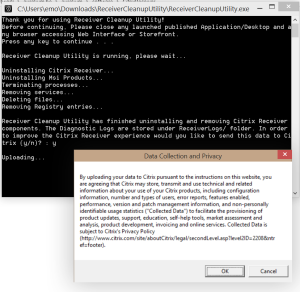
Enjoying the Technical Preview the last few days, only downside was my Citrix Receiver didn’t survive the upgrade… problem: – error message at startup – uninstall fails Luckily there’s an easy fix if you’re in the same situation. – Download the latest Receiver Clean-Up Utility from Citrix here – Run it as admin – (Re)install the …
Sep 30
Introducing Windows 10
Jan 07
Display / Export Wlan Profiles in Windows 7/8/10/11
To display all wireless profiles on your windows start a dos-prompt an type the following command: netsh wlan show profile To export/backup all profiles: create a backup folder md c:\profiles netsh wlan export profile folder=c:profiles (This will export all profiles in separate .xml files) To export specific profiles add name=”profilename” netsh wlan export profile name=”profilename” …

Sponsored by Aurelium NV

Microsoft Learn

Running on Microsoft Azure