
Hi all, Last Wednesday Microsoft released Windows 11 Insider Preview Build 23440 to the Dev Channel. If you miss this month’s Windows Insider webcast featuring the Phone Link team, you can watch it on demand here: https://aka.ms/April2023WIPWebcast. Finally got to update my Dev Devices, as they did not travel to the MVP Summit with me. All updates …
Tag: Windows 11
Apr 23
Announcing Windows 11 Insider Preview Build 25346

Hi all, last Wednesday Microsoft released Windows 11 Insider Preview Build 25346 to the Canary Channel. If you miss this month’s Windows Insider webcast featuring the Phone Link team, you can watch it on demand here: https://aka.ms/April2023WIPWebcast. Installed this build while at Microsoft Capus during the MVP Summit here’s a picture of the current MVP Wall of fame …
Apr 15
Announcing Windows 11 Insider Preview Build 23435
Hi all, yesterday Microsoft released Windows 11 Insider Preview Build 23435 to the Dev Channel. What’s new in Build 23435 Gallery in File Explorer We are introducing Gallery, a new feature in File Explorer designed to make it easy to access your photo collection. The set of content shown in Gallery is the same as what …
Apr 08
The Windows 11 Right-Click menu
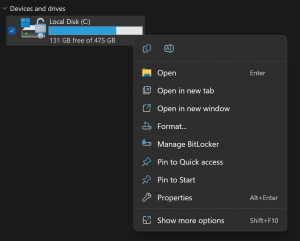
One of the most noticeable changes in Windows 11 is the new right-click menu that appears when you click on a file, folder, or desktop. The new menu is more compact and modern, with rounded corners and icons for common actions. It also integrates with Microsoft’s cloud services, such as OneDrive and Teams. Here are …
Apr 08
Announcing Windows 11 Insider Preview Build 25336
Hi all, Yesterday Microsof treleased Windows 11 Insider Preview Build 25336 to the Canary Channel. A very short blogpost details some of the changes, expecting to find some more while we test this new build 🙂 All Canary devices went smoothly here. Happy upgrades! & Happy Easter! Changes and Improvements [Settings] source: Windows Blogs
Mar 11
Announcing Windows 11 Insider Preview Build 23403
Hi all, last Wednesday Microsoft released Windows 11 Insider Preview Build 23403 to the Dev Channel. This is the 1st build released to the new Dev Channel as these are 23xxx builds, it is not possible to get the build if your device is on 25xxx from being in the Dev Channel before. If you are …
Mar 11
Announcing Windows 11 Insider Preview Build 25314
Hi all, last Wednesday Microsoft released Windows 11 Insider Preview Build 25314 to the Canary Channel, the 1st Canary Channel release. For devices that were in de Dev Channel before, the Canary Channel is the easiest way to continue, they would have been on build 25309 where this one is the next build release now in the …
Mar 05
Announcing Windows 11 Insider Preview Build 25309

Hi all, last Thursday Microsoft released Windows 11 Insider Preview Build 25309 to the Dev Channel. The new ACM options turn a display black in some situations: Feedback Hub: https://aka.ms/AAjvpx7 I’m excited to see the new volume mixer include in quick settings, a very nice addition to Windows 11 features! Happy upgrades! What’s new New volume mixer …
Feb 12
Retreive & install oem bios Windows License key
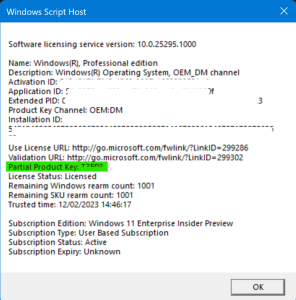
Having trouble with your Windows activation on an OEM device? You might be able to fix it by retrieving the key from the bios. Run this in Powershell (Elevation should not be needed) If your device came with a license this command will show the key (looks like this: XXXXX-XXXX-XXXXX-XXXXX-XXXXX) Next you’ll want to check …

Sponsored by Aurelium NV

Microsoft Learn

Running on Microsoft Azure