Finally the preview is available, time for testing!

Jun 25
Finally the preview is available, time for testing!
Jun 24
In May, NSS Labs issued the results of its study of web browsers in terms of blocking malware. It showed Microsoft’s Internet Explorer 10 blocking 99.96 percent of all malware during their test period, which was a much better percentage than Chrome or Firefox. Today, Microsoft went over some of the features in IE10 that helps it stop malware and other security issues along with the results of another security report.
The official IE blog states that for stopping direct malware attacks via websites, IE10 uses a combination of SmartScreen URL filtering and Application Reputation features. For websites that are normally trusted but become infected by malware, IE10 users can use the XSS Filter that is made to fight off these kinds of exploits. Finally, IE10 has more memory protection features and its Enhanced Protected Mode.

Microsoft cites another third party security report, the Secunia Vulnerability Review 2013, to show IE10 is better than its competitors in offering safer PC Internet browsing. The report claims that IE10 had just 10 Secunia Advisories and 41 vulnerabilities, compared to 28 advisories in Chrome and 28 in Firefox. In terms of vulnerabilities, Secunia said that Chrome had 291 and Firefox had 257.
Of course, Microsoft is about to release the first public preview of IE11 next week for Windows 8 users as part of the Windows 8.1 update.
Source: Microsoft | Image via Microsoft
Jun 23

For those who have been eagerly waiting for information regarding Windows 8.1 and whether or not it will be available in ISO format, today we have good news. The Windows 8.1 Preview will be available in ISO format the same day the update is pushed to the Windows Store, which means you can dual-boot or clean install on any hardware running any operating system.
The ISO will be available from Microsoft directly, however it is unclear where they will distribute them. It’s possible for the ISO’s to be available directly from the Windows 8.1 Preview website, or it a link to the ISO’s will be present on the Windows 8.1 Preview store listing.
Source: MyDigitalLife Forums
Jun 14
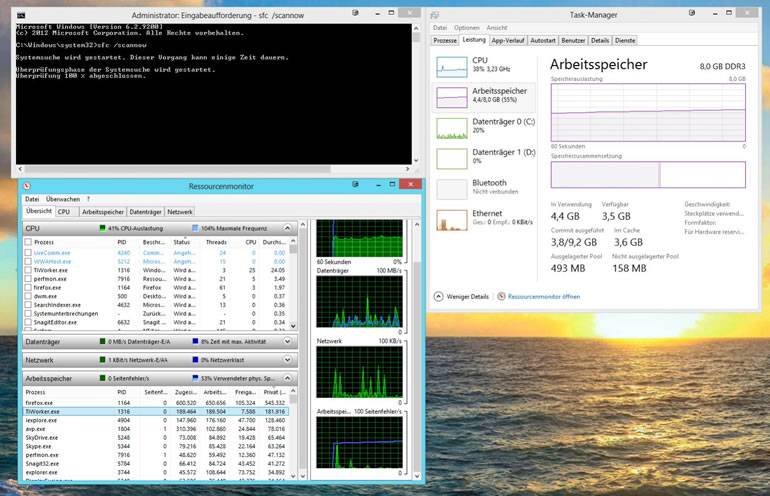
During the June 2013 Patch Tuesday, which took place June 11th, Microsoft rolled out a high-priority non-security update KB2821895 via Windows Update. This “servicing stack update” was available for Windows RT, Windows 8, and Windows Server 2012. However, after installing the update, some users are experiencing some major resource consumption issues when it comes to the System File Checker.
DISM /Online /cleanup-image /RestoreHealth
Jun 09
Register today for this two-day, demo-rich Jump Start aimed at showing IT Pros the new capabilities and features of Windows Server 2012 R2. Join Microsoft Senior Technical Evangelist Rick Claus and Lead Architect & President of holSystems Corey Hynes as they go through details of Windows Server 2012 vs Windows Server 2012 R2. Get ready for this live online interactive experience highlighting the latest and greatest via numerous scenarios and demos all while answering questions from the audience.
course outline
Day 1
01 | Introducing Windows Server 2012 R2
02 | Server Virtualization in WS 2012 R2
03 | Cloud Optimized Networking in Windows Server 2012 R2
04 | Storage in Windows Server 2012 R2
Day 2
01 | Server Management & Automation with Windows Server 2012 R2
02 | VDI with Windows Server 2012 R2
03 | Access & Information Protection with Windows Server 2012
04 | Web Application & Platform with Windows Server 2012
Instructors:
Rick Claus (Senior Technical Evangelist)
Corey Hynes (Lead Architect & President)
Jun 09
Join us a full day Jump Start where you will learn what is new with System Center 2012 R2. Are you ready to discover the new capabilities in infrastructure provisioning and monitoring, automation and self-service, IT service management and application monitoring? Get ready for Microsoft Senior Technical Evangelist Symon Perriman and several presenters as they go through the next version of System Center and how it delivers an end-to-end cloud management stack through advanced integration with Windows Server 2012 R2 and Windows Azure.
Course Outline
01 | Introduction to the Cloud OS 02 | Infrastructure Provisioning 03 | Infrastructure Monitoring 04 | Application Management 05 | Automation 06 | IT Service Management
Jun 09
New in Hyper-v 2012 R2:
VM Replication to 3rd location
VM Replication with 30s increments
Faster live migration thanks to compression of SMB Direct
Online vm export / cloning
Online VHDX resizing
Server 2012 R2 improvements:
Automated Tiering ( store frequent accessed files on SSD and archives on standard HD)
…
source: http://www.cio.com/article/734509/Windows_Server_2012_R2_Bulks_Up_on_Storage_and_Networking
Jun 06
On Thursday, June 20th 2013, the Belgian Microsoft Community will bring you a full day of sessions for both developers and IT Professionals! The event will take place in Utopolis, Mechelen.
14 user groups will outperform themselves to bring you their view on Microsoft products in more than 25 sessions.
Click here for more details.
But we have 5 tickets to give away and it could not be easier. Just e-mail us at coreteam @ technine.be and the first five respondents will be winners.
May 15
Windows Codename ‘Blue’ to be called Windows 8.1 will be a free update through the windows store.
Release date is set for the end of the year, public preview will be available in June 26th.
source:
Apr 14
During April 2013 Patch Tuesday, Microsoft released an update for Windows 7 (KB2823324) which was a security update for the Windows 7 file system kernel-mode driver. Unfortunately for some users, this update has resulted in an infinite reboot loop.
Microsoft is aware of this issue and has issued a formal statement. “We’ve determined that the update, when paired with certain third-party software, can cause system errors. As a precaution, we stopped pushing 2823324 as an update when we began investigating the error reports, and have since removed it from the download center,” Microsoft stated in an official blog post.
Microsoft has released KB2839011 to address this issue, which helps Windows 7 users uninstall the update, if it was already installed. Microsoft ha since removed KB2823324 from Windows Update to avoid any further problems.
Microsoft has provided two ways to remove the update. First is via the Control Panel, under programs and installed updates, simply select and remove “Security Update for Microsoft Windows (KB2823324).” If that does not work, you can use command prompt to remove the update. Hit the source link for technical details on how to remove it.