Hi all, With 20H2 release around the corner, on September 30th Microsoft released 20H2 Build 19042.546 (KB4577063) to the Beta and Release Preview Channels for those Insiders who are on 20H2 (Windows 10 October 2020 Update). This update includes all of the fixes included as part of 20H2 Build 19042.541 plus these additional fixes:
We fixed an issue that prevents a device from entering Modern Standby.
We fixed a reliability issue in Microsoft Edge that occurs when you open multiple windows or tabs.
Hi All, Last Wednesday Microsoft released Windows 10 Insider Preview Build 20221 to Windows Insiders in the Dev Channel.
Mostly smooth updates here, one device took more then 5 hours but runs fine now…
After the update, you might get a notification to help improve speech to text & notice when you select the button to to settings dismissed the message instead of opening up settings, I’ve already feedbacked that one: https://aka.ms/AA9qbe0
What’s new in Build 20221
Introducing Meet Now in the Windows 10 Taskbar
Earlier this year we introduced Meet Now in Skype. Meet Now makes it easy to connect with anyone in as little as two clicks for free and each call can last up to 24 hours. Today, we’re excited to share that we are extending this capability in Windows 10 by bringing Meet Now right to the taskbar. You can now easily set up a video call and reach friends and family in an instant by clicking on the Meet Now icon in the notification area (system tray) of the taskbar in Windows 10. No sign ups or downloads needed.
Create a meeting:
Join a meeting:
This feature is rolling out to a subset of Insiders in the Dev Channel at first, to help us quickly identify issues that may impact performance and reliability. Rest assured they will be gradually rolled out to everyone in the Dev Channel.
Other updates for Insiders
Your Phone Notifications gets a new pinning feature
We are excited to announce that the Your Phone app has a new pinning feature integrated with the notifications feed. With notifications pinning, you can easily pin to save important notifications that will stick to the top of your feed so they are readily accessible and distinguished from the rest of your notifications. To try out this feature, find a notification you want to pin and click the ellipses in the overflow menu. There you will see the option “Pin notification”.
Since the notification will now stick to the top of your feed, you no longer have to worry about losing the notification and can easily access the thread and use all your favorite functionality, like in-line reply. When you no longer need that notification thread, you can simply unpin it by clicking the unpin icon.
This is a gradual rollout, so it may take a few days for notifications pinning to show up within the Your Phone app. Give this feature a try and continue to provide us with your valuable feedback within the Your Phone app under Settings > Help & Feedback > Send Feedback.
Changes and Improvements
As some Insiders may have noticed, we’re adding a notification to let you know when an app registers to run at startup (Settings > Apps > Startup Apps).
With most of the launches of the People app coming directly from within the Mail and Calendar apps in Windows 10, the People app no longer appears as a standalone app in Start. It remains as an inbox app and can be launched to manage your contacts from the button in the Mail and Calendar apps.
Fixes
We fixed an issue where the new Manage Disks and Volumes section in Settings wasn’t blocking the ability to change the drive letter of the system volume.
We fixed an issue that could result in Start menu, and Action Center being totally transparent when certain apps were open in the background.
We fixed an issue that could result in a crash when opening the Power menu in Start while running Magnifier at a high zoom level.
We fixed an issue that could result in a virtual desktop thumbnail in Task View showing an empty desktop even after moving an app over to that desktop.
We fixed an issue when typing with an IME into text fields in certain apps that could result in input no longer being accepted.
We fixed an issue that could result in the Chinese Pinyin IME candidate pane getting stuck on the first letter when typing into certain games.
We fixed an issue that could result in Windows Update getting stuck at “Downloading – 0%” for a long time.
We fixed seeing generic errors when using wsl --install in the Windows Subsystem for Linux.
We fixed a bug where the Linux kernel would not be installed when using wsl --install in the Windows Subsystem for Linux.
Known issues
We’re looking into reports of the update process hanging for extended periods of time when attempting to install a new build.
We’re working on a fix to enable live preview for pinned site tabs.
We’re working on enabling the new taskbar experience for existing pinned sites. In the meantime, you can unpin the site from the taskbar, remove it from the edge://apps page, and then re-pin the site.
We’re investigating reports of some Office applications crashing or missing after updating to a new build.
We’re working on a fix for an issue resulting in Settings crashing for some Insiders when opening Manage Disks and Volumes.
We’re investigating reports of some devices experiencing a KMODE_EXCEPTION bugcheck when using certain virtualization technologies.
We are investigating an issue affecting Windows Subsystem for Linux 2 distros where users can receive the error: “The remote procedure call failed” on startup.
We’re investigating a bug where the vEthernet adapter in Windows Subsystem for Linux 2 distros becomes disconnected after a period of use. For full details please follow this GitHub thread.
ADDED 9/24: We’re investigating reports where after taking this build some users receive a Compatibility Assistant notification that “Microsoft Office is no longer available”. Despite the notification, Office should still be there and working fine.
Hi All, Last Wednesday Microsoft released Windows 10 Insider Preview Build 20221 to Windows Insiders in the Dev Channel.
Mostly smooth updates here, one device took more then 5 hours but runs fine now…
After the update, you might get a notification to help improve speech to text & notice when you select the button to to settings dismissed the message instead of opening up settings, I’ve already feedbacked that one: https://aka.ms/AA9qbe0
What’s new in Build 20221
Introducing Meet Now in the Windows 10 Taskbar
Earlier this year we introduced Meet Now in Skype. Meet Now makes it easy to connect with anyone in as little as two clicks for free and each call can last up to 24 hours. Today, we’re excited to share that we are extending this capability in Windows 10 by bringing Meet Now right to the taskbar. You can now easily set up a video call and reach friends and family in an instant by clicking on the Meet Now icon in the notification area (system tray) of the taskbar in Windows 10. No sign ups or downloads needed.
Create a meeting:
Join a meeting:
This feature is rolling out to a subset of Insiders in the Dev Channel at first, to help us quickly identify issues that may impact performance and reliability. Rest assured they will be gradually rolled out to everyone in the Dev Channel.
Other updates for Insiders
Your Phone Notifications gets a new pinning feature
We are excited to announce that the Your Phone app has a new pinning feature integrated with the notifications feed. With notifications pinning, you can easily pin to save important notifications that will stick to the top of your feed so they are readily accessible and distinguished from the rest of your notifications. To try out this feature, find a notification you want to pin and click the ellipses in the overflow menu. There you will see the option “Pin notification”.
Since the notification will now stick to the top of your feed, you no longer have to worry about losing the notification and can easily access the thread and use all your favorite functionality, like in-line reply. When you no longer need that notification thread, you can simply unpin it by clicking the unpin icon.
This is a gradual rollout, so it may take a few days for notifications pinning to show up within the Your Phone app. Give this feature a try and continue to provide us with your valuable feedback within the Your Phone app under Settings > Help & Feedback > Send Feedback.
Changes and Improvements
As some Insiders may have noticed, we’re adding a notification to let you know when an app registers to run at startup (Settings > Apps > Startup Apps).
With most of the launches of the People app coming directly from within the Mail and Calendar apps in Windows 10, the People app no longer appears as a standalone app in Start. It remains as an inbox app and can be launched to manage your contacts from the button in the Mail and Calendar apps.
Fixes
We fixed an issue where the new Manage Disks and Volumes section in Settings wasn’t blocking the ability to change the drive letter of the system volume.
We fixed an issue that could result in Start menu, and Action Center being totally transparent when certain apps were open in the background.
We fixed an issue that could result in a crash when opening the Power menu in Start while running Magnifier at a high zoom level.
We fixed an issue that could result in a virtual desktop thumbnail in Task View showing an empty desktop even after moving an app over to that desktop.
We fixed an issue when typing with an IME into text fields in certain apps that could result in input no longer being accepted.
We fixed an issue that could result in the Chinese Pinyin IME candidate pane getting stuck on the first letter when typing into certain games.
We fixed an issue that could result in Windows Update getting stuck at “Downloading – 0%” for a long time.
We fixed seeing generic errors when using wsl --install in the Windows Subsystem for Linux.
We fixed a bug where the Linux kernel would not be installed when using wsl --install in the Windows Subsystem for Linux.
Known issues
We’re looking into reports of the update process hanging for extended periods of time when attempting to install a new build.
We’re working on a fix to enable live preview for pinned site tabs.
We’re working on enabling the new taskbar experience for existing pinned sites. In the meantime, you can unpin the site from the taskbar, remove it from the edge://apps page, and then re-pin the site.
We’re investigating reports of some Office applications crashing or missing after updating to a new build.
We’re working on a fix for an issue resulting in Settings crashing for some Insiders when opening Manage Disks and Volumes.
We’re investigating reports of some devices experiencing a KMODE_EXCEPTION bugcheck when using certain virtualization technologies.
We are investigating an issue affecting Windows Subsystem for Linux 2 distros where users can receive the error: “The remote procedure call failed” on startup.
We’re investigating a bug where the vEthernet adapter in Windows Subsystem for Linux 2 distros becomes disconnected after a period of use. For full details please follow this GitHub thread.
ADDED 9/24: We’re investigating reports where after taking this build some users receive a Compatibility Assistant notification that “Microsoft Office is no longer available”. Despite the notification, Office should still be there and working fine.
Hi All, Last Wednesday Microsoft released Windows 10 Insider Preview Build 20215 to Windows Insiders in the Dev Channel.
At last Dark mode for search in start, so nice! even though it’s posted here as a feature of this build, it did show up for me earlier on the release-day still on 20211
Voice Typing still has some issues on some devices where the wrong interface show up failing to find a mic.
Other updates for Insiders
Windows 10 search now supports dark theme
For Insiders who have their system theme set to dark, we are introducing dark theme search results for the Windows 10 search experience on the taskbar. This server-side change is rolling out to all Windows Insiders in the Dev Channel. This change will make the transition between Start and search results easier on the eyes now that both support dark theme. Let us know what you think!
Fixes
We fixed an issue that could result in the Windows Security app hanging.
We fixed an issue that could result in the Windows Security app crashing when navigating to the Exclusions page when there were a large number of exclusions.
We fixed an issue where using a restore point that had been created prior to a Microsoft Edge update to do a system restore could result in Microsoft Edge not launching after the restore was finished.
We fixed an issue resulting in the text cursor unexpectedly moving to the beginning of a text field when typing with the Korean IME in certain apps.
We fixed an issue impacting Voice Typing reliability.
We’ve fixed an issue where on a small subset of devices the Start menu did not reflect when an update was pending restart and scheduled restarts are cancelled.
Known issues
We’re looking into reports of the update process hanging for extended periods of time when attempting to install a new build.
We’re working on a fix to enable live preview for pinned site tabs.
We’re working on enabling the new taskbar experience for existing pinned sites. In the meantime, you can unpin the site from the taskbar, remove it from the edge://apps page, and then re-pin the site.
We’re investigating reports of some Office applications crashing or missing after updating to a new build.
We’re working on a fix for an issue resulting in Settings crashing for some Insiders when opening Manage Disks and Volumes.
We’re investigating reports of some devices experiencing a KMODE_EXCEPTION bugcheck when using certain virtualization technologies.
We’re working on a fix for the Linux kernel not being installed when using the wsl --install command in the Windows Subsystem for Linux. For an immediate workaround run wsl --update to get the latest kernel version.
We are investigating an issue affecting Windows Subsystem for Linux 2 distros where users can receive the error: “The remote procedure call failed” on startup.
We’re investigating a bug where the vEthernet adapter in Windows Subsystem for Linux 2 distros becomes disconnected after a period of use. For full details please follow this Github thread.
We’re working on a fix for seeing generic errors when using wsl --install in the Windows Subsystem for Linux.
Ah, finally September, time for another event. No we didn’t forget, yes we are late, yes we know… but still … better one close notice event than no event I would reckon.
Our next event will be on the 28th of September (28/09/2020), with three full sessions and a virtual tech bar at the end. [sorry it is a byob (bring your own beer) bar.]
We start the evening with Micha Wets our own WVD guru. With the spring update and the integration with ARM, there is a new variety of deployment options. This session will guide you in the wondrous world of ARM deployment and how to leverage Azure Devops to deploy WVD automated from scratch.
The second session of the evening is given by Erik Moreau and André van den Berg, both Windows Insider MVP. Their session will be loaded with LPT tips and how to unleash Windows 10 full potential to make your daily life easier.
In the third session, Didier Van Hoye explains all you need to know about the newly release Azure Virtual WAN feature. This is not your typical enterprise solution, it is beneficial for everyone from SMB to Enterprise. Learn about Azure Virtual WAN, Firewall Manager, Virtual WAN HUB, Custom Tables, and more in and explore and adopt these new exciting capabilities.
To end the day we open our Virtual Tech Bar where we slow chat about any topic you bring up. It is a bring-your-own-beer kind of type event as we do not have the luxury of an in person event – it is what it is 🙂
Hi All, Microsoft released Windows 10 Insider Preview Build 20211 to Windows Insiders in the Dev Channel on Thursday, a day later than the usual schedule due to the Labor-day holiday on Monday
What’s new in Build 20211
Adding Search to the Default Apps pages in Settings
After making some updates to help improve performance, this change to enable searching the lists of file types, protocols, and apps when setting a default is now rolling out to all Insiders in the Dev Channel – thanks everyone who’s shared feedback along the way.
Access Linux file systems in the Windows Subsystem for Linux
This latest insiders preview build adds the ability for users to attach and mount a physical disk inside of a WSL 2 distro. This enables you to access file systems that aren’t natively supported by Windows (such as ext4). So if you’re dual booting with Windows and Linux, and are using different disks, you can now access your Linux files from Windows! To learn more about this feature please read this blog post on the Windows Command Line blog.
Updates for developers
The Windows SDK is now flighting continuously with the Dev Channel. Whenever a new OS build is flighted to the Dev Channel, the corresponding SDK will also be flighted. You can always install the latest Insider SDK from aka.ms/InsiderSDK. SDK flights will be archived in Flight Hub along with OS flights.
Fixes
Fixed an issue where certain 32-bit applications running on a 64-bit OS do not get properly promoted to the discrete GPU for hybrid configurations.
We fixed an issue that could result in Start menu tiles continuing to display an “app update in progress” progress bar after an app had already finished updating.
We fixed an issue that could result in some of the app icons in Start appearing unexpectedly tiny.
We fixed an issue on ARM64 devices resulting in Start crashing on launch the next time it was opened after launching certain apps from Start and then closing them.
We fixed an issue that could result in the lock screen hanging.
We fixed an issue that could result in ShellExperienceHost.exe hanging.
We fixed an issue where hero images weren’t showing up in notifications (for example, when taking a screenshot using WIN + Shift + S).
We fixed an issue from the last few flights that could result in Windows update getting stuck while downloading the update.
[ADDED] You will no longer get asked to reinstall a .NET update after each flight.
Known issues
We’re looking into reports of the update process hanging for extended periods of time when attempting to install a new build.
We’re working on a fix to enable live preview for pinned site tabs.
We’re working on enabling the new taskbar experience for existing pinned sites. In the meantime, you can unpin the site from the taskbar, remove it from the edge://apps page, and then re-pin the site.
We’re investigating reports of some Office applications crashing or missing after updating to a new build.
We’re working on a fix for an issue resulting in Settings crashing for some Insiders when opening Manage Disks and Volumes.
We’re working on a fix for the Linux kernel not being installed when using the `wsl –install` command in the Windows Subsystem for Linux. For an immediate workaround run `wsl –update` to get the latest kernel version.
We are investigating an issue affecting Windows Subsystem for Linux 2 distros where users can receive the error: “The remote procedure call failed” on startup.
We’re working on an issue where on a small subset of devices the Start menu does not reflect when an update is pending restart and scheduled restarts are cancelled. To install the next update, you will need to update and restart through the Windows Update settings page, notification area (system tray) icon, or restart notification.
We’re investigating reports of some devices experiencing a KMODE_EXCEPTION bugcheck when using certain virtualization technologies.
We’re investigating a bug where the vEthernet adapter in Windows Subsystem for Linux 2 distros becomes disconnected after a period of use. For full details please follow this Github thread.
We’re working on a fix for seeing generic errors when using `wsl –install` in the Windows Subsystem for Linux.
Hi all, Wednseday, a bit later than usual Microsoft released Windows 10 Insider Preview Build 20206 to Windows Insiders in the Dev Channel.
“With today’s build, we are delivering a set of input features to Insiders that are designed to meet our customers where they are and letting them express themselves how they see fit in Windows. Our goal is to make Windows even better at helping our customers communicate using text and voice on their devices.”
The Updated Emoji picker, Windows-key + . or ; looks & feels awesome
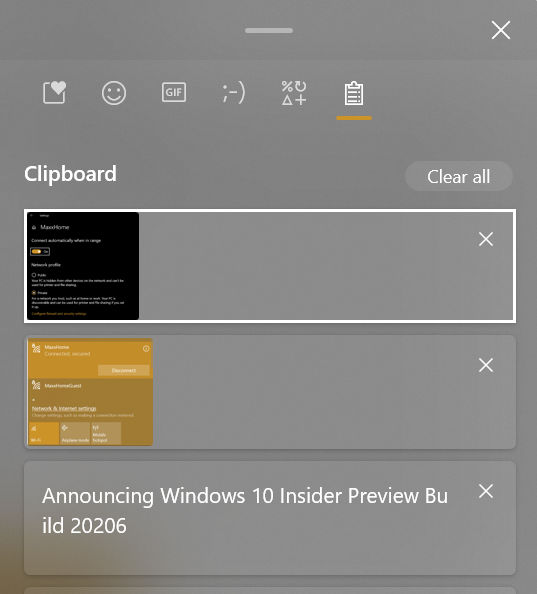
It’s even integrated into the Windows-key + v Clipboard History
Emoji picker also in clipboard history app
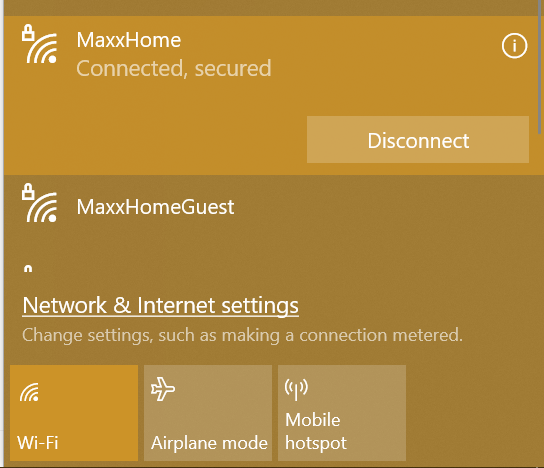
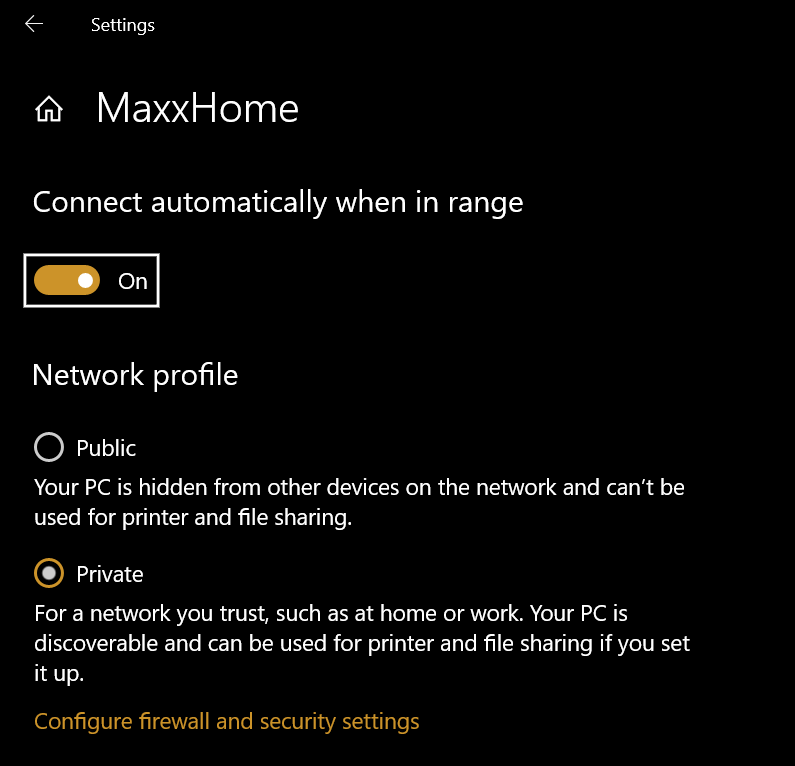
The Wireless Network flyout shows this new circled i bringing you to the properties of the connection in settings when selected
New properties button on network flyout
Upgrades went smooth here, Enjoy Upgrading!
What’s new in Build 20206
Evolving the Emoji Picker
Over the last 3 years, we have been adding ways to express yourself when typing in Windows. In addition to adding an emoji picker and support for more emoji, we have also added support for many more languages, kaomoji, and symbols. We have also added ways to manage your clipboard history. We are evolving the emoji picker in Windows to bring many of these separate experiences together as well as introduce some new capabilities such as easy access to animated GIFs.
We know that you need more than just emojis to properly convey your message when communicating using text. To that end, we’ve revamped the emoji picker to be a one-stop for expressing yourself while you type on your device! This new experience offers:
An updated design: We are making the experience more aligned with our Fluent Design principles, including a new acrylic background.
Emoji search: We are improving discoverability of emoji search in supported languages by having an inline search box.
Animated GIF support, including search: Going forward, WIN + [.] and WIN + [;] will now enable you to quickly input animated GIFs. The selection of animated gifs will be continuously updated based on current trends and #hashtags. Search is also available for those times where you need to find the perfect reaction gif to succinctly communicate your message.
Converging our input experiences across emoji and clipboard history: We are bringing input and clipboard history together into a single experience. You can still press WIN + V to go straight to clipboard history, but now you can also access it by switching to the “Clipboard” category after pressing WIN + [.] or WIN + [;].
We will be continuing to work on input in Windows and would love to hear your thoughts on further improvements. We are lighting up a new area path in the Feedback Hub for you to share your suggestions: Input and Language > Emoji, Kaomoji, GIF and other input.
Please note: In order to insert an animated GIF when typing, the text field needs to support it. Animated GIF search requires an internet connection and is powered by Tenor. For more details about languages where animated GIF search is supported by Tenor, please see here.
This feature is rolling out to a subset of Insiders in the Dev Channel at first, to help us quickly identify issues that may impact performance and reliability. Rest assured they will be gradually rolled out to everyone in the Dev Channel.
Introducing Voice Typing
Windows voice typing is the new and improved version of Windows dictation that enables you to type effortlessly with your voice wherever there’s a text field on your PC. Sometimes, using your voice is more comfortable and efficient than typing on a keyboard – with Windows voice typing, you can relax your hands and just say what you want to write.
Improved features for voice typing include:
A modern design – optimized for use with touch keyboards.
Auto-punctuation that allows you to effortlessly put your thoughts down without worrying about question marks and periods (turn it on in settings).
An updated back end for the most reliable voice typing experience ever on Windows.
Easily start voice typing any time by using the keyboard shortcut (WIN + H) or tapping the microphone button on the touch keyboard.
When using the hardware keyboard:
When using the touch keyboard:
Want to up your voice typing to the next level? Try out the following supported voice commands:
Voice typing is available in the following languages/locales*:
English (US)
English (Australia)
English (India)
English (Canada)
English (United Kingdom)
French (France)
French (Canada)
Portuguese (Brazilian)
Simplified Chinese
Spanish (Mexico)
Spanish (Spanish)
German
Italian
Japanese**
*Voice typing will automatically use the language your keyboard is set to (if supported). **Auto-punctuation is not available in Japanese at this time.
Please note: we are still working to improve the feature and how it interacts with different applications. In some Office apps you may experience random pauses while using the voice typing feature. If this happens, click the microphone icon again to restart the listening experience.
This feature is rolling out to a subset of Insiders in the Dev Channel at first, to help us quickly identify issues that may impact performance and reliability. Rest assured they will be gradually rolled out to everyone in the Dev Channel.
Improving the touch keyboard design
Some Insiders will start to see our new touch keyboard design rolling out to their PCs. The updated design includes a fresh aesthetic and many other small tweaks, including updated key sizes / layouts to optimize for typing comfort & accuracy. We have also done some work to help improve discoverability and usability of available features.
While exploring the updated design, you will notice a number of refinements, including:
New key press animations and sounds.
Child keys have been optimized for quicker entry – try pressing and holding keys like “e” or “-“ and see how it looks.
For those who prefer to keep their keyboard undocked, the option now accessible via a button directly in the candidate bar, and you can easily move the keyboard around using the gripper region at the top of the keyboard.
All entries in the settings menu now have labels for improved clarity of available options.
We are bringing emoji search to the touch keyboard, so you no longer need to hunt through the different categories to find the one you are looking for. More so, you can also now search for animated GIFs. All accessible from our new expressive input button in the candidate bar. (For more – see our section above on evolving the emoji panel.)
A new entry point into voice typing has been added to the left of the space bar in supported languages. (See above section on voice typing.)
The touch keyboard can also be invoked on any PC from the touch keyboard button on the taskbar, although you may need to enable the button. To do so, right-click or press and hold on the taskbar, then select “Show touch keyboard button” in the menu. Once the touch keyboard is open, try typing or shapewriting on the keyboard and let us know how it feels.
We want to thank Insiders for sharing their feedback about the touch keyboard over the years – your comments directly inspired these changes. We look forward to you trying them out and to even more feedback!
Please note: Some of the keyboard layouts for certain languages are still in the process of being updated to the new design. Currently shapewriting is only supported when using the wide or onehanded touch keyboard layouts.
This feature is rolling out to a subset of Insiders in the Dev Channel at first, to help us quickly identify issues that may impact performance and reliability. Rest assured they will be gradually rolled out to everyone in the Dev Channel.
Cursor movement using the space bar
One thing we heard from our customers is the desire to change the cursor position with the touch keyboard. Based on that feedback, we are updating the keyboard so that you can now quickly do this in any text field using gestures on the space bar.
All you need to do is place a finger on the space bar and slide your finger left, right, up, or down. As your finger moves, so will the cursor – one character or line at a time.
We’ll be continuing to work on input in Windows and would love to hear your thoughts on further improvements.
This feature is rolling out to a subset of Insiders in the Dev Channel at first, to help us quickly identify issues that may impact performance and reliability. Rest assured they will be gradually rolled out to everyone in the Dev Channel.
Changes and Improvements
When annotated content and linked control Narrator commands are invoked on context which doesn’t have any linked controls available, Narrator will now say “No linked item”.
When setting focus to Windows Explorer in the Processes tab of Task Manager, we’re updating the keyboard shortcut for the Restart option to now be Alt + R.
Fixes
We fixed an issue where the new option to enable DNS encryption wasn’t persisting after update.
We fixed an issue leading to certain apps not launching due to nlsdl.dll being missing.
We fixed a race condition in the last few builds that could result in some Insiders experiencing scaling issues after waking their PC from sleep when using multiple monitors.
We fixed an issue that could result in the Narrator Home crashing when using the back button.
We fixed an issue where after adding a VPN connection, Narrator focus would move to the Settings home button rather than read that the VPN connection had been successfully added.
We fixed an issue from the last two flights resulting in Office documents opening blank when opened from File Explorer rather than from within the app.
We’ve fixed an issue in the Mail app preventing syncing with certain mail services.
We’ve fixed an issue causing some devices to receive bugchecks with error code KERNEL_MODE_HEAP_CORRUPTION.
We fixed an issue that could result in Task Manager erroneously indicating that a non-UWP app had been suspended.
We’ve mitigated an issue with the previous build causing some devices to download larger than normal amounts of data during the update process. This may have resulted in slower downloads and disk space warnings. If you continue to experience the issue with this build, please file a new feedback.
We’ve made improvements to address issues where the new taskbar experience for pinned websites wasn’t working for some websites. If you continue encountering issues, please ensure you’re running the latest version of Microsoft Edge Dev or Canary, and report the issue using the Feedback button in Microsoft Edge if you are.
Known issues
We’re looking into reports of the update process hanging for extended periods of time when attempting to install a new build.
We’re working on a fix to enable live preview for pinned site tabs.
We’re working on enabling the new taskbar experience for existing pinned sites. In the meantime, you can unpin the site from the taskbar, remove it from the edge://apps page, and then re-pin the site.
We’re investigating reports of some Office applications crashing or missing after updating to a new build.
We’re investigating reports of the Settings app crashing when opening Manage Disks and Volumes.
We’re working on a fix for the Linux kernel not being installed when using the wsl –install command in the Windows Subsystem for Linux. For an immediate workaround run wsl –update to get the latest kernel version.
[ADDED 9/3] We are investigating an issue affecting Windows Subsystem for Linux 2 distros where users can receive the error: “The remote procedure call failed” on startup.
Hi all, last Wednesday Microsoft released Windows 10 Insider Preview Build 20201 to Windows Insiders in the Dev Channel.
Though downloading was kind of slow in the 1st hours after release, upgrades went smoothly, the window action buttons (minimize, maximize & close) now follow the edge of your app window again
Enjoy upgrading!
Fixes
We’ve fixed an issue where some Microsoft Store games protected by Easy Anti-Cheat failed to launch. Some games may still need to release an update to fully resolve the issue.
We fixed an issue where the IME mode indicator in the taskbar was indicating that the IME was enabled when it was actually in disabled state.
We fixed an issue in the last few flights resulting in HDR monitors appearing black when HDR was enabled.
We fixed an issue where the min/max/close buttons were stuck in their original positions after resizing a UWP app.
We fixed an issue where SetInputScope wasn’t working if it was called after the app had been initialized.
Known issues
We’re looking into reports of the update process hanging for extended periods of time when attempting to install a new build.
We’re investigating reports that the new taskbar experience for pinned sites isn’t working for some sites.
We’re working on a fix to enable live preview for pinned site tabs.
We’re working on enabling the new taskbar experience for existing pinned sites. In the meantime, you can unpin the site from the taskbar, remove it from the edge://apps page, and then re-pin the site.
We’re working on a fix for an issue where pinned sites don’t show all open tabs for a domain. In the meantime, you can fix this by pinning the site’s homepage rather than a specific page (e.g. pin microsoft.com rather than microsoft.com/windows).
We’re working on a fix to resolve syncing issues in the Mail app with certain mail services.
We’re working on a fix for an issue where Office documents may open blank when opened from File Explorer. If you encounter this issue on this build or Build 20197, the file should render correctly if opened from within the app rather than File Explorer.
We’re investigating reports of some Office applications crashing or missing after updating to a new build.
We’re investigating reports of some devices receiving a bugcheck with error code KERNEL_MODE_HEAP_CORRUPTION.
We’re investigating reports of the Settings app crashing when opening Manage Disks and Volumes.
Hi all, Yesterday Microsoft released Windows 10 Insider Preview Build 20197 to Windows Insiders in the Dev Channel., slightly delayed due to a blocking issue to release 20195 on Wednesday
Download & upgrades went very smooth here, Modern Disk Management is here for everyone
Enjoy upgrading!
What’s new in Build 20197
Bringing Disk Management into Settings
We mentioned we had more Settings work on the way, and here’s the next one – as of today’s build you’ll now be able to manage your disks and volumes from within the Settings app. This includes tasks such as viewing disk information, creating and formatting volumes, and assigning drive letters.
Unlike the existing Disk Management MMC snap-in, this modern experience was built from the ground up to with accessibility in mind. It also features better integration with features such as Storage Spaces and the Storage breakdown page.
Go to Settings > System > Storage and click Manage Disks and Volumes to get started. We’d love to hear your feedback once you try it out.
The existing Disk Management MMC snap-in is still available for those that need it.
[ADDED] Note about the new post-update experience
The new post update experience with the Tips app mentioned with Build 20190 was a trial run for this experience to get feedback and gauge interest and specific only to Build 20190. You will not see this experience on newer builds. Insiders may see other experiences like this one on newer builds coming soon.
Other updates for Insiders
Your Phone Apps experience is now gradually rolling out to General Public
We are excited to announce that the Your Phone apps feature which was highlighted during Aug 5th Samsung Unpacked event is now gradually rolling out to General Public. As a reminder, Your Phone apps feature allows you to instantly access your Android phone’s mobile apps directly from your Windows 10 PC. You can conveniently pin your favorite mobile apps to your Taskbar or Start menu on your PC for quick and easy access. When you launch an app, it opens in a separate window outside of the Your Phone app enabling you to multitask. So, whether you need to quickly reply to a conversation, respond to your social posts, or order food, you can do it fast using your PC’s large screen, keyboard, mouse, pen and touch screen alongside your other PC apps!
PC running Windows 10 October 2018 Update or later. However, we always recommend updating to the latest version of Windows 10.
Your Phone app (1.20071.88) and Link to Windows (2.0).
Available on select Android phones running Android 9.0 or greater with the Link to Windows integration. Check out the list of supported phones here.
Phone and PC must be on the same Wi-Fi network.
This is a gradual rollout, so it may take few days for Apps to show up within the Your Phone app. Give this feature a try and continue to provide us with your valuable feedback within the Your Phone app under Settings -> Send Feedback.
Changes and Improvements
We’re updating the ALT + Tab behavior with Microsoft Edge tabs to now have a default of displaying at most 5 tabs, rather than any recent tabs. If at any point you’d like to change this, you can under Settings > System > Multitasking.
We’re exploring including a Web Browsing section in the Settings header, and Insiders may start to see this.
Going forward only the currently active profile picture will display under Your Info in Settings.
Based on feedback we’re turning off ESENT Warning Event ID 642.
It’s now possible to select the new Microsoft Edge as your desired app in Assigned Access.
We’ve updated Narrator so that now when using the Microsoft Pinyin IME, Narrator is able to distinguish candidate characters/words by providing detailed reading information.
Fixes
We fixed an issue where the letter headers in the Start menu’s all apps list had unnecessary left padding when the all apps list was set to hidden.
We fixed an issue where ALT + Tabbing to a browser tab sometimes moved the previously active browser tab to the front of the Alt + Tab list as well.
We fixed an issue where if you’d pinned a website to your taskbar and then moved your Microsoft Edge window with that site open over to a different virtual desktop, the pinned sit wouldn’t show the corresponding open tabs on that new desktop.
We fixed an issue where the sysprep command was failing with the error 0x80073CFA in the last few builds.
We fixed an issue where Group Policy Editor was showing a popup error about WnsEndpoint_Policy in the last few flights.
We fixed an issue where the Get-Volume PowerShell command wasn’t recognizing volumes in the exFAT format.
We fixed an issue impacting explorer.exe launch performance when booting up and logging in for the first time.
We fixed an issue where pinned File Explorer folders in Start would appear with a darker background than other tiles in light mode.
We fixed a race condition that could result in the Font Settings page crashing.
We fixed an issue where Font Settings and Themes Settings were displaying the old style of Microsoft Store icon.
We fixed an issue that could result in the Network Status page in Settings showing an old network name, rather than the one that you’re currently connected to and inconsistent with what the network flyout displayed.
We fixed an issue resulting in certain VPNs with the option “Automatically use my Windows log-on name and password (and domain, if any) enabled no longer connecting automatically.
We fixed an issue resulting in some Insiders experiencing a bugcheck in recent builds citing a hyperguard violation.
We fixed an issue when using the search box in File Explorer, where pressing the enter key would result in keyboard focus jumping to the quick access section of the navigation pane rather than to the search results.
We fixed an issue with the Microsoft Pinyin IME, where typing certain phrases would result in the candidate pane unexpectedly dismissing.
We fixed an issue with the Microsoft Pinyin IME, where when using double pinyin style, when typing something like “goldb;du” where the first candidate could be an English word the conversion wouldn’t work.
We fixed an issue when typing with the Japanese IME that could result in not being able to input symbols using Shift+<number keys> into password fields sometimes.
We fixed an issue that could result in certain apps crashing when typing incorrect combinations with the Chinese Traditional DaYi IME.
We fixed an issue with the Microsoft Bopomofo IME where it was consuming Shift key up events when they resulted in IME mode toggle actions.
We fixed an issue that could result in a CTFMON.exe when changing focus to certain apps (like Outlook) while typing with an IME.
We fixed an issue where ImmGetCompositionString wasn’t returning the correct IME composition string for YOMI text fields.
We fixed an issue where the Windows key on the full touch keyboard layout wouldn’t become highlighted after tapping on it in recent builds.
We fixed an issue when using Narrator where Scan Mode wouldn’t stay off in Microsoft Teams.
We fixed an issue resulting in Microsoft Flight Simulator failing to launch on the previous two flights with an error citing: “The filename, directory name, or volume label syntax is incorrect”.
Known issues
We’re working on a fix for an issue where some Microsoft Store games protected with Easy Anti-Cheat may fail to launch.
We’re looking into reports of the update process hanging for extended periods of time when attempting to install a new build.
We’re working on a fix for an issue where the min/max/close buttons are stuck in their original positions after resizing a UWP app. If you move the app window the position should update.
We’re investigating reports that the new taskbar experience for pinned sites isn’t working for some sites.
We’re working on a fix to enable live preview for pinned site tabs.
We’re working on enabling the new taskbar experience for existing pinned sites. In the meantime, you can unpin the site from the taskbar, remove it from the edge://apps page, and then re-pin the site.
We’re working on a fix for an issue where pinned sites don’t show all open tabs for a domain. In the meantime, you can fix this by pinning the site’s homepage rather than a specific page (e.g. pin microsoft.com rather than microsoft.com/windows).