Project Bicep: ARM Templates reloaded (extended version)
If you’re into infrastructure as code, this is a session you do not want to miss! During the week of Ignite 2021, Bicep version 0.3 was released making it ready for production usage as the next evolution of ARM templates. In this demo-heavy session we’ll touch base on the fundamentals of ARM and the architecture of Project Bicep. We’ll perform a deep dive into the latest Bicep features like loops, conditions, decompiling, Az CLI integrations and Azure DevOps deployments! Join us as we flex our muscles and show you how to empower ARM Templates!
21h20: Little break and let’s talk about it afterwards
Tune in for some technical updates on the latest Microsoft technologies.
Bring your Windows questions for Windows Insider MVP’s Erik Moreau & Andre Van Den Berg
Hi all, Last Wednesday Microsoft released Windows 10 Insider Preview Build 21359 to Windows Insiders in the Dev Channel.
This build has the News & interests bar enabled for all, if you do not see it after upgrade, reboot your device 1 more time.
Websites installed as an App coming from Edge Canary are missing from start menu on this build, recreating the apps restore them to the start menu https://aka.ms/AAbz72e
Looks like I ran into a race condition where taskbar was frozen resuming from stand-by, let me know if you should see this. https://aka.ms/AAbvwkz
All smooth upgrades here, Happy upgrading!
Changes and Improvements
We have added an option under the Power menu on the Start menu to restart apps after signing in when you reboot your device. When this setting is checked, it toggles the option under Settings > Accounts > Sign-in options > Restart apps we introduced in 20H1.
If you have your activity history synced across your devices through your Microsoft account (MSA), you will no longer have the option to upload new activity in Timeline. AAD-connected accounts won’t be impacted. To view web history, Edge and other browsers have the option to look back at recent web activities. You can also view recently used files using OneDrive and Office. Note: Timeline and all your local activity history still remain on Windows 10.
We’re updating the Ease of Access category in Settings to now be called Accessibility.
We’re updating the Ebrima font to now support characters from Bamum (Unicode block U+A6A0 to U+A6FF).
We’re updating the Nirmala UI font family to improve how the Chakma characters are displayed when combined based on feedback.
Thank you to the Insiders who have taken the time to share feedback about the new version of our Korean IME. For the time being we will be reverting to the version included in previous releases.
Fixes
We fixed a bug that caused an issue when HDR was turned on, where the SDR content was being changed when the computer was locked or coming back from sleep.
We fixed the issue where in in some cases, Auto HDR might not correctly enable for all eligible titles. If you still run into trouble, please reach out to us via the Feedback Hub, on our Twitter (@DirectX12), or on the DirectX Discord.
We fixed the issue in the previous flight where in some cases user accounts were migrated during the upgrade, but the user profile was not. This issue would occur if a device was abruptly restarted during the upgrade process.
We fixed an issue where some cameras did not support adjustment in the Camera Settings page when the camera was also in use by another app.
We fixed an issue where the Camera Settings page was crashing on ARM devices.
We fixed an issue where Windows Update Settings might unexpectedly display two separate strings saying that updates are managed by your organization.
We fixed an issue where some non-managed devices were displaying “Some of these settings are hidden or managed by your organization” on the Settings > Update & Security > Windows Update page.
We fixed an issue impacting WSUS users where the “Check online for updates from Microsoft Update” option in Windows Update Settings was greyed out.
We fixed an issue resulting in some Insiders noticing frequent crashes in wuauclt.exe.
We fixed an issue resulting in the window frames losing their shadows after locking and unlocking your PC.
We fixed an issue resulting in some users seeing an ms-resource:AppListName entry in the Start menu apps list because of the People app change to no longer be displayed in the app list.
We fixed an issue that could result in a toast notification appearing on top of the Action Center.
We fixed an issue in recent flights where the UI would hang if you quickly used the touchpad gesture to switch back and forth between Virtual Desktops.
We fixed an issue impacting the ability to use Miracast with some devices in recent builds.
We fixed an issue that could result in the network connection on certain device and ethernet configurations getting stuck in an “Identifying…” state recently.
We fixed an issue where after upgrading to recent builds you couldn’t connect using remote desktop until you rebooted your PC.
We fixed an issue resulting in the brightness controls behaving erratically on some devices in recent builds.
We fixed an issue impacting some Insiders when playing certain full screen games in recent builds, resulting in the frame rate being unexpectedly lowered. If you continue experiencing issues in this space, please log feedback following the steps here.
We fixed an issue resulting in some games crashing on launch when Auto HDR was enabled.
We fixed an issue for certain devices that could result in the screen going black with only the mouse visible. If you continue experiencing black screen issues after upgrading, please press WIN + CTRL + Shift + B and then report it in the Feedback Hub under Display and Graphics > Black Screen, including as many details as possible.
We fixed an issue resulting in certain videos displaying distorted and pixelated in recent builds.
We fixed an issue where some devices received “The follow things need your attention…” error messages when attempting to install a new build.
We fixed an issue where getting and setting your international settings wasn’t working with PowerShell 7.1.
We fixed an issue where updates to your language list using the PowerShell commands wouldn’t be synced to your other devices if you had syncing enabled.
We fixed a race condition when using the Pinyin IME that could result in no longer being able to type in certain apps (until restarting the app) if you rapidly typed and selected IME candidates.
We fixed the issue impacting the migration of shortcuts into the new Windows Tools location where This PC shows up with the display name “computer.”
[ADDED] We fixed the issue where virtual GPU was broken for Windows and Linux guests.
Known issues
We’re looking into reports of the update process hanging for extended periods of time when attempting to install a new build.
[News and interests] Pressing ESC key to dismiss an opened context menu in the flyout dismisses the whole flyout instead.
[News and interests] Sometimes the news and interests flyout cannot be dismissed with pen.
[ARM64] Insiders who installed the preview version of the Qualcomm Adreno graphics driver on the Surface Pro X may experience reduced brightness of the display. This issue is fixed with an updated version of the preview graphics driver at https://aka.ms/x64previewdriverprox. If you are experiencing this issue, please see the feedback collection for more information.
We’re investigating an issue where elements of Search (including the search box in File Explorer) are no longer displaying correctly in dark theme.
Some non-administrative apps, such as 3D Viewer and Print 3D, that were previously in the Windows Accessories folder are now in Windows Tools. These app shortcuts will be moved back into Start with an upcoming bug fix. They are still searchable and accessible via Windows Tools in the meantime.
The Windows Camera App currently does not respect the default brightness setting set via the new Camera Settings page.
Accessing the virtual GPU is broken for Windows and Linux guests, adding a vGPU to a VM will have no effect and the VM will continue running with software rendering. FIXED.
Theme-aware splash screens are not visible in this build. A fix is coming to re-enable this in a future flight.
Split screen mode for Auto HDR does not work in this build; please look to the next build for a fix.
We’re working on a fix for an issue causing some USB attached printers to no longer work after upgrading to Build 21354 and higher.
We’re working on a fix resulting in WSL users finding that File Explorer launch performance regressed after upgrading to Build 21354 and higher.
Hi all, Last Wednesday a couple of hours later than usual, Microsoft released Windows 10 Insider Preview Build 21354 to Windows Insiders in the Dev Channel.
Starting with today’s build, Windows Insiders will notice that the name of the branch we are releasing builds as shown on the desktop watermark at the lower right of the desktop from has changed to CO_RELEASE. Just like we did back in October when we released builds from the FE_RELEASE branch, we can change which branch we flight builds from. As our engineers work in development cycles internally, we may prioritize work being done in a specific branch and may need to move Insiders between branches. We are treating these builds the same as we would treat builds from the RS_PRERELEASE branch.
Search is fixed! yay! 2 weeks of sometimes working search was challenging 😉
New personalization options for news and interests on the taskbar
Thanks for your continued feedback for news and interests on the Windows taskbar! We’re continuing to develop the experience based on your suggestions. Today, we’re pleased to announce a new set of features rolling out for personalizing the feed to suit your interests.
Now, when you hover on the weather on your taskbar, you’ll see a new “Manage interests” button appear at the top of the window. This button links to a new full-page personalization experience, where you can choose the topics that you’re interested in. New users may also see a personalization card in their feed to help them get started.
Use the search box at the top of the “My interests” page to search for the topics or publishers you want to follow. You can also discover interests by browsing over a dozen categories, including different types of news, entertainment, and sports topics. When you select a topic to follow, you’ll see more stories about it in your feed as stories become available. You can manage the topics you’re following by selecting “Followed interests” in the left navigation.
We’re also excited to announce, “Tune your feed”, available from the left navigation on the “My interests” page. This experience makes it easy to explore and follow publishers from our partner ecosystem and select example articles that pique your interest. Select a couple of publishers and stories to get started or scroll to see more. You can see and manage the publishers you’re following by clicking “Followed Publishers” on the left navigation. You can also tune your feed wherever you see a story. Click the “X” on the top right of the card to remove the article and provide feedback: “Not interested in this story”, “Don’t like the source”, or “Report an issue”. We’ve refined this experience based on user feedback, to give you another way to fine-tune your feed for your preferences.
These new personalization experiences are now available in several markets, including the U.S., U.K., Canada, India, and Australia, with global rollout continuing. We look forward to hearing what you think about these new options for personalizing news and interests!
Reminder: We continue to roll out news and interests to Windows Insiders, so it isn’t available to everyone in the Dev Channel just yet.
Improvements to Display Settings
Content adaptive brightness control (CABC) disabling: CABC helps improve battery performance on PCs, but with the trade-off of decreased image quality. It can result in distracting brightness changes that interfere in experiences where image quality is of high importance such as for creative professionals looking for color accuracy. The ability to turn CABC off has been a highly requested feature and Windows Insiders can now disable CABC directly in the Display settings via Settings > System > Display.
Note: Depending on your device, you may see just one (or both) of the checkboxes seen under the brightness slider below. To find out if your device has CABC support, you can look at your GPU control panel.
HDR certification: To bring awareness to high quality HDR displays and educate customers, we are bringing HDR certification to Settings > System > Display under “Advanced display settings” with the latest Insider Preview builds. Under this settings page, a display’s HDR certifications will be shown.
We will be rolling out this feature over time and are starting with select Dolby Vision and VESA DisplayHDR models, so please don’t be alarmed if in the Advanced display settings, you see that your display has no HDR certification even though it is certified.
New Camera Settings page
We are extremely excited to introduce a new Camera Settings page we’ve been working on, giving users the ability to add/remove cameras and configure the default image settings of each one.
This page allows you to manage cameras through the Settings app, whether they’re connected directly to the device (like a webcam) or are ONVIF IP cameras on your local network (for more info on ONVIF support in Windows, see this blog post). This new Settings page can be found at Settings > Devices > Camera. Each camera has a “Configure” button that lets you make changes to the default brightness and contrast – letting you get rid of the pesky backlight that always shadows your face in your video calls. Depending on what features are supported by your camera, you can configure brightness and contrast, enable Video HDR or Eye Contact, or correct for camera rotation.
We look forward to hearing your feedback about this new feature. Please try out the Configure default image settings for your camera Quest on Feedback Hub and then send us your feedback at the end – we’d love to hear what other features you’d like to see, and if you run into any issues with your specific PC, camera and/or video app.
Inbox app updates
MSPaint is now updated via the Microsoft Store:
MSPaint is now updateable via the Microsoft Store outside major OS updates. It also has a new icon and has been promoted out of the Windows Accessories folder to its own place in the Start menu.
Snipping Tool is now updated via the Microsoft Store:
Snipping Tool is now updateable via the Microsoft Store outside major OS updates. It has been packaged together with Snip & Sketch so we can deliver updates for both at the same time. It has also been promoted out of the Windows Accessories folder to its own place in the Start menu.
NOTE: Because we’re combining both Snip & Sketch and Snipping Tool, Insiders who previously did not have Snip & Sketch installed will see Snipping Tool removed after updating to this build and will have to go and install Snip & Sketch from the Store to get it back.
Organizing all the admin and system tools under Windows Tools:
In Build 21343, we announced we changed the name of the Windows Administrative Tools folder in Start to Windows Tools as part of an effort to better organize all the admin and system tools in Windows 10. In Build 21354, we are continuing that effort. The Windows Accessories, Windows Administrative Tools, Windows PowerShell, and Windows System folders have now been removed from Start and the apps within these folders can now be accessed via the Windows Tools entry point that directs to the full apps list in File Explorer. All these apps will still appear in via search, launch via any method, can be pinned to Start or taskbar, and any customized shortcuts in the folder paths will remain intact. Also, File Explorer has been moved into its own place in the Start menu as part of this work.
Changes and Improvements
[News and interests] As mentioned previously, we have enabled the ability to deselect “Open on hover” in the “News and interests” taskbar options. This is based on your feedback.
The default path to access Linux files from Windows using the Windows Subsystem for Linux has been changed from `\\wsl\\` to `\\wsl.localhost\\` to improve performance and reliability. You will still be able to access Linux files using `\\wsl$\\`.
Under Settings > Update & Security > Change active hours, you will find the toggle turned on for “Automatically adjust active hours for this device based on activity”, if you have never adjusted this feature. We are starting a roll out a change for Insiders that makes this setting on by default. With this setting turned on, Windows Update will be able to schedule automatic restarts when you are typically not using your device more accurately.
As of the latest versions of Microsoft Edge, all pinned sites (regardless of what version you were using when you pinned them), should now use the taskbar behavior described here without you first having to unpin and re-pin the site.
On ARM64 devices, you can now toggle compatibility settings for x64 applications.
Under Settings > Personalization > Device usage, you can select all the ways you plan to use your device to get customized suggestions for tips, tools, and services.
Fixes
[Gaming] We fixed an issue where certain games may crash, will not sync save data when a game is played on a different device, or will not save when a new game is installed.
[File Explorer] We fixed an issue resulting in all folders pinned to Quick Access in File Explorer disappearing if you installed Build 21343. Please note that this fix prevents the issue from occurring going forward, it will not bring back the ones that were unpinned if you installed the impacted build previously.
[File Explorer] We fixed an issue resulting in some Insiders experiencing that the entire folders section of Quick Access was missing after installing the previous flight.
We fixed an issue impacting Search reliability in the previous flight.
[News and interests] Fixed an issue where news and interests could occlude other content on the taskbar especially on smaller screens.
We fixed an issue where the tooltip text for items in Start’s Power button menu wasn’t displaying correctly.
We fixed an issue resulting in a crash if you entered WinPE and tried to enable Narrator using WIN + CTRL + Enter.
We fixed an issue resulting in some Insiders experiencing a bug check with error SYSTEM_THREAD_EXCEPTION_NOT_HANDLED when rebooting or shutting down in the previous flight.
We fixed an issue that could result in a bugcheck when starting WSL.
We fixed an issue that could result in the Windows Update Settings page showing progress dots but never loading.
We fixed an issue where navigating to Power and Sleep in Settings would crash Settings.
We fixed the issue where a random toggle that didn’t do anything was appearing under Settings > Personalization > Lock screen.
We fixed an error resulting in some Insiders recently seeing an error when trying to add a password to a local account that was created without a password.
We fixed an issue where if you opened the Pinyin IME settings via Search, the Settings page would be unexpectedly blank.
We fixed an issue that could result in your desktop background going black after snapping an app to the side of your screen.
We fixed an issue where some of the text in Snipping Tool wasn’t displaying correctly.
We fixed an issue causing the Handwriting Input Panel to not work for pen input on ARM64 PCs.
We fixed an issue impacting clipboard history reliability.
We fixed an issue resulting in characters being duplicated in certain apps when typing with the Korean IME.
We fixed an issue resulting in not being able to insert composition strings when typing with an IME after copying and pasting a text box in PowerPoint.
We fixed an issue resulting in key events being lost when renaming files in File Explorer while typing with an IME.
We fixed an issue where when typing with the Japanese or Chinese IMEs in certain apps that have their own UI for IME candidates, the IME candidates were not displayed in the app’s UI.
The fix we mentioned in Build 21327 to address an issue where a toggled key on the touch keyboard had the wrong background color is now rolling out to all Insiders in the Dev Channel.
We fixed an issue causing an increase in login time in the previous flight.
We fixed an issue resulting in some Insiders finding that boot time was longer in the previous flighting.
We fixed an issue resulting in the network button on the login screen not working and potentially crashing.
We fixed an issue causing some logins to hang on a black screen. If you continue to see a similar problem, please file a new feedback in Feedback Hub.
We fixed an issue that could result in freezes when watching videos in Chromium-based browsers in recent Dev Channel builds.
Known issues
We’re looking into reports of the update process hanging for extended periods of time when attempting to install a new build.
[News and interests] Pressing ESC key to dismiss an opened context menu in the flyout dismisses the whole flyout instead.
[News and interests] Sometimes the news and interests flyout cannot be dismissed with pen.
[ARM64] Insiders who installed the preview version of the Qualcomm Adreno graphics driver on the Surface Pro X may experience reduced brightness of the display. This issue is fixed with an updated version of the preview graphics driver at https://aka.ms/x64previewdriverprox. If you are experiencing this issue, please see the feedback collection for more information.
We’re investigating an issue where elements of Search (including the search box in File Explorer) are no longer displaying correctly in dark theme.
We’re working on a fix for an issue introduced in the previous flight impacting WSUS users where the “Check online for updates from Microsoft Update” option is greyed out. If you are impacted, you can run the following command from an elevated Command Prompt to set the reg key so that scan will check Microsoft servers:
Then click the regular “Check for updates” button in Windows Update Settings. Please note, if the scan needs to be done repeatedly the reg key will need to be re-added each time, as scanning reads and erases the key.
Due to an issue with migrating the shortcuts into the new Windows Tools location, This PC shows up with the display name “computer.” We already have a bug fix on the way to address this issue.
Some non-administrative apps, such as 3D Viewer and Print 3D, that were previously in the Windows Accessories folder are now in Windows Tools. These app shortcuts will be moved back into Start with an upcoming bug fix. They are still searchable and accessible via Windows Tools in the meantime.
The Windows Camera App currently does not respect the default brightness setting set via the new Camera Settings page.
Some cameras currently may not support adjustment in the Camera Settings App when the camera is also in use by another app.
Accessing the virtual GPU is broken for Windows and Linux guests, adding a vGPU to a VM will have no effect and the VM will continue running with software rendering.
[ADDED] Theme-aware splash screens have disappeared in this build. A fix is coming to re-enable this in a future flight.
[ADDED] In some cases, Auto HDR might not correctly enable for all eligible titles. To ensure that Auto HDR is enabled for all eligible titles, please visit Settings > Display > HDR settings and confirm that Auto HDR is turned on. If you still run into trouble, please reach out to us via the Feedback Hub, on our Twitter (@DirectX12), or on the DirectX Discord.
[ADDED 4/9] Split screen mode for Auto HDR does not work in this build; please look to the next build for a fix.
Hi all, last Wednesday Microsoft released Windows 10 Insider Preview Build 21343 (RS_PRERELEASE) to Windows Insiders in the Dev Channel.
Smooth upgrades here, the search crashing issue in start menu is kind of annoying but being worked on 😉 https://aka.ms/AAbo23f
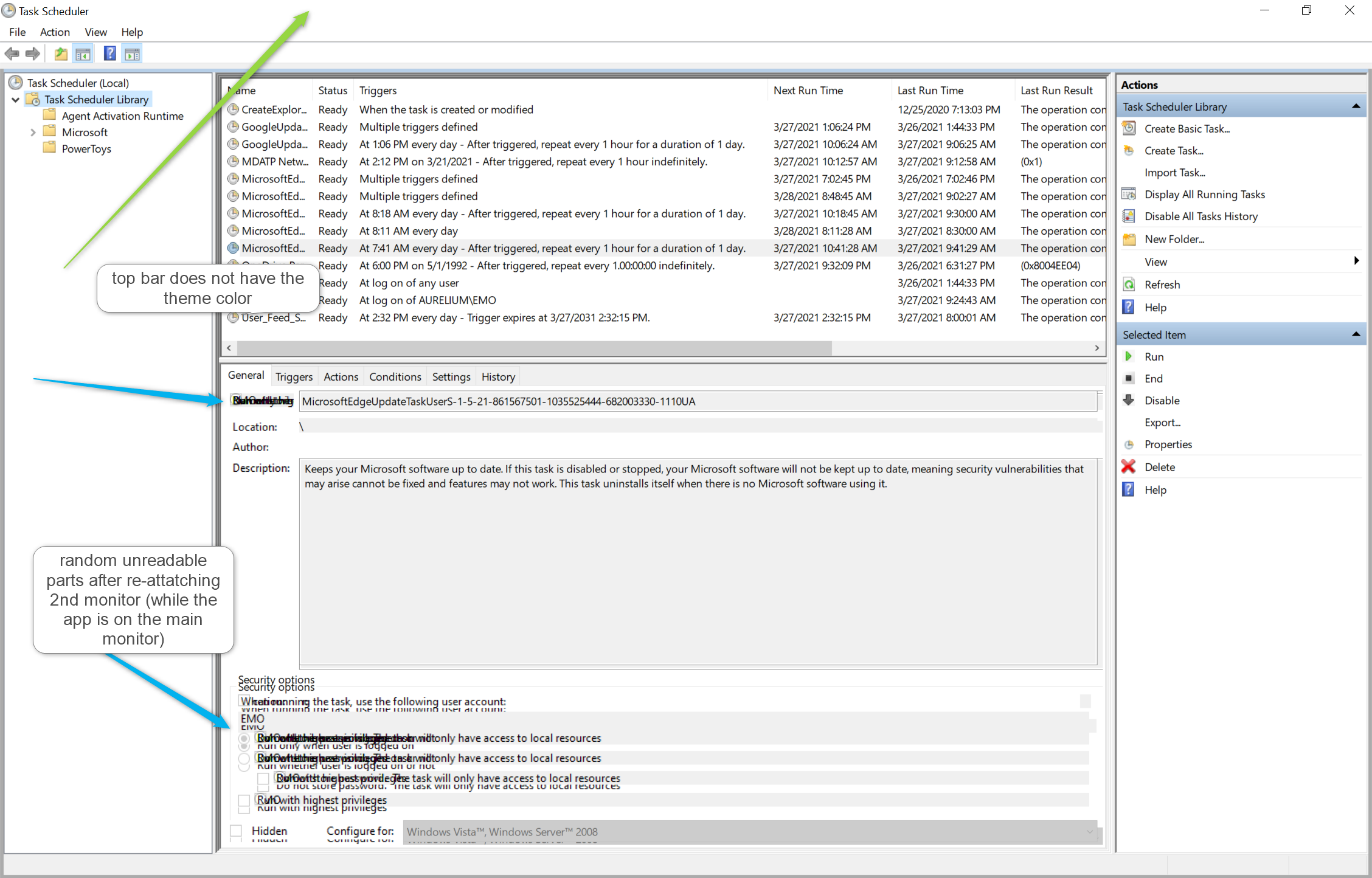
Task Scheduler has a non-working top window bar (minimize, maximize, close) when a 2nd monitor is attached as extended https://aka.ms/AAboyve
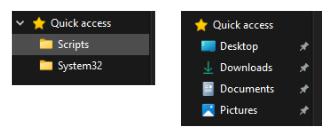
If you lost you Quick Access like me, the fix deleting this string %appdata%\Microsoft\Windows\Recent\AutomaticDestinations\f01b4d95cf55d32a.automaticDestinations-ms (from known issues) restores the defaults
before & after
update, just experienced an unexpected shutdown, without GSOD or dump the device just turned off… hopefully a rare occasion https://aka.ms/AAbosb8
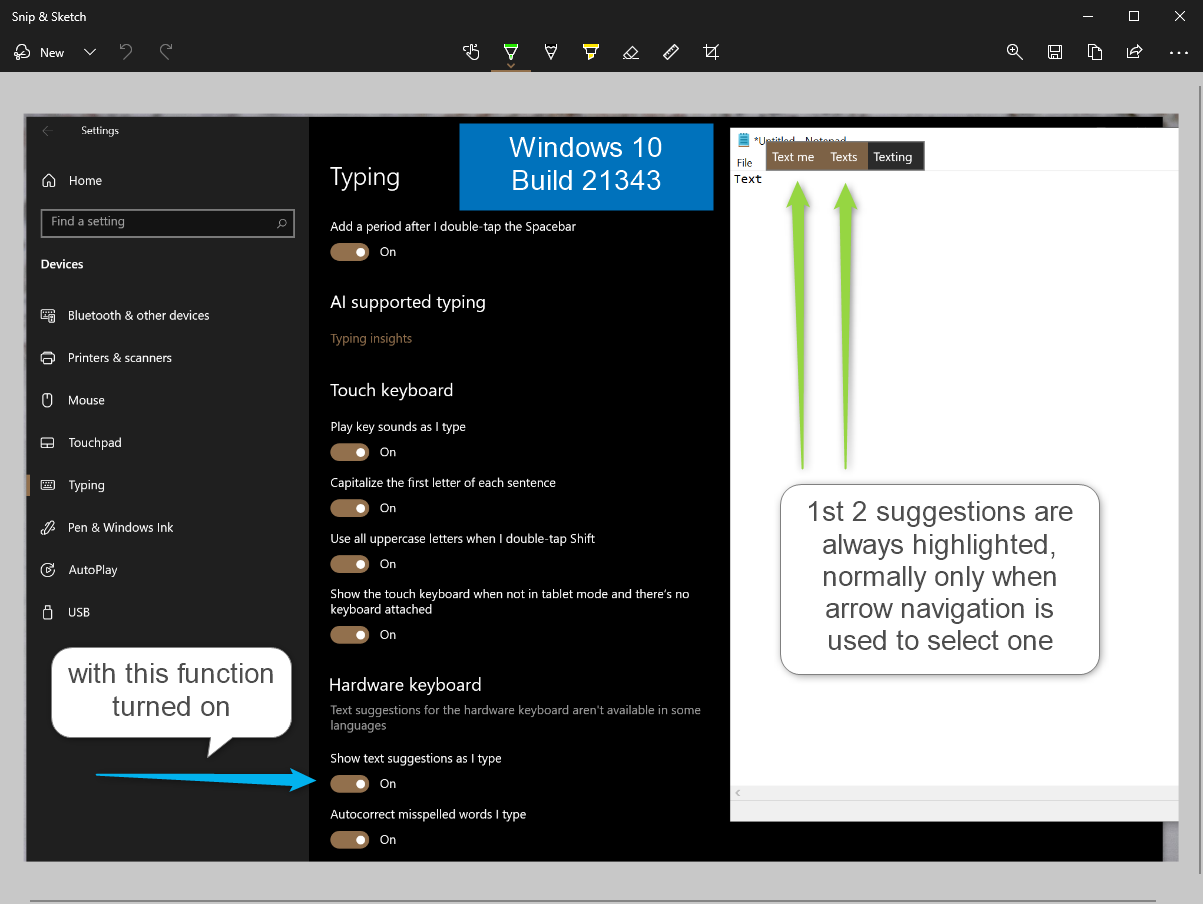
update, Type Suggestions for the hardware keyboard are highlighted https://aka.ms/AAboyzn
The new Icons are awesome, feels like a brand new pc every time I open up explorer!
Please note: After upgrading to this build, any custom folders pinned to Quick Access will disappear. You can either make note of them prior to updating to this build or pause updates until we get a fix in.
Several changes, such as the orientation of the folder icons and the default file type icons, have been made for greater consistency across Microsoft products that show files. Notably, the top-level user folders such as Desktop, Documents, Downloads, and Pictures have a new design that should make it a little easier to tell them apart at a glance. And yes, the Recycle Bin icon has also been updated!
As you can imagine, there are a lot of icons in Windows 10 and more icons will continue to get updated over time.
Improvements to Windows Sandbox and Microsoft Defender Application Guard (MDAG)
Both Windows Sandbox and Microsoft Defender Application Guard take advantage of special container technology built into Windows 10. Previously, the container runtime matched the host. Starting with Build 21343, we are introducing a new runtime that is designed and optimized for container scenarios. It is lightweight and allows faster launch times for both Windows Sandbox and Microsoft Defender Application Guard.
We do not expect this change to affect the application compatibility inside Windows Sandbox. However, this is a significant change and users may encounter some differences in behavior.
We’re changing the name of the Windows Administrative Tools folder in Start to Windows Tools. We are working to better organize all the admin and system tools in Windows 10.
[News and interests] Update on the rollout: following our last update on languages and markets, this week we’re also introducing the experience to China! We continue to roll out news and interests to Windows Insiders, so it isn’t available to everyone in the Dev Channel just yet.
We are now rolling out the new IME candidate window design to all Windows Insiders in the Dev Channel using Simplified Chinese IMEs.
We’re updating the “Get Help” link in the touch keyboard to now say “Learn more”.
We’re updating File Explorer when renaming files to now support using CTRL + Left / Right arrow to move your cursor between words in the file name, as well as CTRL + Delete and CTRL + Backspace to delete words at a time, like other places in Windows.
Based on feedback, if the Shared Experiences page identifies an issue with your account connection, it will now send the notifications directly into the Action Center rather than repeated notification toasts that need to be dismissed.
Fixes
We fixed an issue where devices with certain NVMe drives were experiencing disk resets or WHEA_UNCORRECTABLE_ERROR bugchecks.
We fixed an issue where some devices were receiving DPC_WATCHDOG_ERROR bugchecks.
We fixed an issue where some devices with Realtek network adapters running driver version 1.0.0.4 were experiencing intermittent loss of network connectivity.
[News and interests] Fixed an issue where on some occasions the news and interests button text was using the wrong high contrast color.
[News and interests] Fixed an issue where news and interests may not be available when signing into Windows without internet access but returns when online.
[News and interests] We’ve made multiple fixes to help improve performance and reliability for explorer.exe.
We fixed an issue resulting in explorer.exe crashing with Event ID 1002.
We fixed a memory leak when interacting with the Recycle Bin.
We fixed a deadlock in recent Dev Channel builds related to the Indexer, which could result in not being able to launch Start menu or other apps on first boot after an upgrade.
We fixed an issue where on some high-refresh-rate monitors, games would only run at 60Hz. This issue may have also resulted in tearing in variable-refresh-rate monitor scenarios.
We fixed an underlying issue resulting in some apps crashing during install and potentially other activities recently.
We fixed an underlying issue resulting in some apps unexpectedly displaying a message saying, “You must restart your computer before the new settings will take effect.” recently.
We fixed in issue resulting in blurry text on secondary monitors in recent Dev Channel build when the monitor was set to portrait orientation.
We fixed an issue impacting the reliability of WIN + Shift + Left / Right Arrow in recent builds.
We fixed an issue where the size information for large capacity drives could be truncated in File Explorer’s properties dialog.
We fixed an issue that could result in the header at the top of Settings having truncated text in some languages.
We made a fix to help address an issue where the user profile picture in the Settings header would flicker when resizing the window. Please let us know if you’re still noticing this after upgrading.
We fixed an issue where after changing audio end points the volume controls in Sound Settings might stop working.
We fixed an issue where the Properties and Data Usage options were missing in Network Status settings page recently.
We fixed an issue where if you searched for “Advanced touchpad gesture configuration” and clicked the result, it would just launch Settings, and not that specific Settings page.
We fixed an issue resulting in Settings crashing for some Insiders after launching it by double clicking on the Windows Update icon in the taskbar.
We fixed an issue that was blocking Azure Data Studio from updating to a newer version on ARM64.
We fixed issues that were causing Ngen.exe to fail to precompile .NET Framework binaries on ARM64.
We fixed an issue that could result in some of the touch keyboard’s child keys being cut off.
We fixed an issue where a flick up on the top row of the touch keyboard wouldn’t insert the corresponding number when using the small touch keyboard layout, unlike the other layouts.
We fixed an issue that could result in display issues with the IME candidate windows after switching between light and dark theme.
We fixed an issue where after typing a very long string of text the Japanese IME could become disabled.
We fixed an issue where it wasn’t possible to use SHIFT + Space in Excel when typing with the Japanese IME.
We fixed an issue with the Japanese IME where it wasn’t possible to enter a sentence that began with “を” when typing in Kana input mode.
Known issues
[Gaming] There is an issue in this build where certain games may crash, will not sync save data when a game is played on a different device, or will not save when a new game is installed. We are working on a fix, but if you believe this may impact you, to avoid any potential data corruption, we recommend you pause updates until we release a new build with the fix.
[File Explorer] After installing this build, all folders pinned to Quick Access in File Explorer will disappear. Please make sure to take note of what is pinned prior to upgrading, so you can find those folders again.
[File Explorer] Some Insiders may experience that the entire folders section of Quick Access is missing. If you encounter this, deleting this string %appdata%\Microsoft\Windows\Recent\AutomaticDestinations\f01b4d95cf55d32a.automaticDestinations-ms will bring back the section, however it will not bring back the items that became unpinned. We are working on a fix for this and appreciate your patience.
We’re looking into reports of the update process hanging for extended periods of time when attempting to install a new build.
We’re working on enabling the new taskbar experience for existing pinned sites. In the meantime, you can unpin the site from the taskbar, remove it from the edge://apps page, and then re-pin the site.
[News and interests] Pressing ESC key to dismiss an opened context menu in the flyout dismisses the whole flyout instead.
[News and interests] Sometimes the news and interests flyout cannot be dismissed with pen.
[ARM64] Insiders who installed the preview version of the Qualcomm Adreno graphics driver on the Surface Pro X may experience reduced brightness of the display. This issue is fixed with an updated version of the preview graphics driver at https://aka.ms/x64previewdriverprox. If you are experiencing this issue, please see the feedback collection for more information.
The network flyout on the login screen doesn’t open on this build, which will prevent you from connecting to a new network before logging in. If your account is in a state that requires internet to log in, you can work around the issue by plugging in Ethernet, getting the device in range of a previously configured Wi-Fi network, or logging in with any other available account first.
The Handwriting Input Panel will not work for pen input on ARM64 PCs running this build.
There is an issue in this build that may result in Search crashing on launch for some Insiders. We are working on a fix.
Hi all, Last Wednesday Microsoft released Windows 10 Insider Preview Build 21337 (RS_PRERELEASE) to Windows Insiders in the Dev Channel.
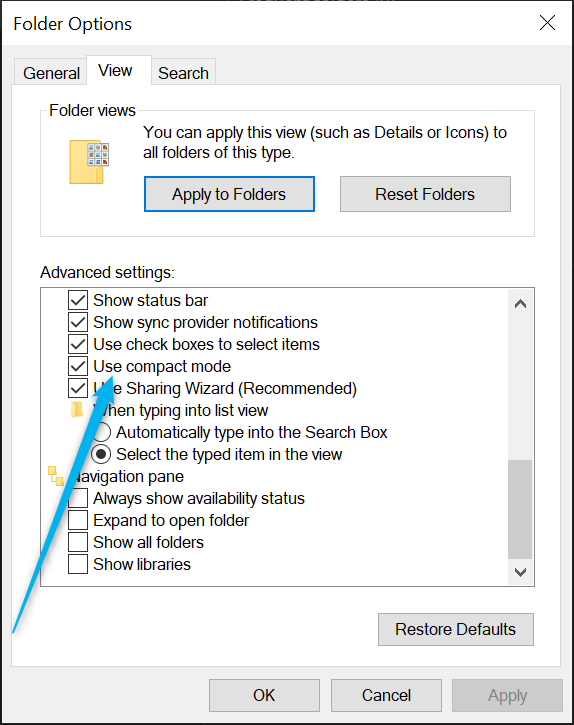
Quite some new stuff, although I’m not really fund of the new explorer layout, enabling compact mode in the Folder options/View restored the layout we’re used to.
Upgrades went smooth, also on the device that had some issues getting to 21333 on Friday a pipline servicing update was also released bringing the Build to 21337.1010
Notepad, Power Automate Desktop & Windows Terminal are finally in box apps, if you haven’t tried them, test them, you’ll like these 😉
What’s new in Build 21337
Reorder and customize your Virtual Desktops
We’ve heard your feedback asking for more control over Virtual Desktops. Starting with Build 21337, we are bringing the ability to reorder and customize the backgrounds for each of your Virtual Desktops! You can access your Virtual Desktops via Task View (Win + Tab).
Virtual Desktops help you cognitively separate different tasks on your PC, including helping to create work-life separation. They can be swapped into view, letting you shift your work from one desktop to another. Instead of juggling multiple windows, you can switch between Virtual Desktops to multitask.
Here are the steps you can take to try these new features out.
Change Virtual Desktop background:
Under Settings > Personalization > Background, left click a background to change the background for the active Virtual Desktop.
Right clicking a background on this Settings page has a new option to change the background for a specific Virtual Desktop.
Once you’ve made the change, you’ll see your new background when you switch to that Virtual Desktop, and in the preview thumbnail in Task View.
Reorder Virtual Desktops:
Enter Task View (via Win + Tab), create multiple new Virtual Desktops.
Drag and drop a Virtual Desktop to another position in the list in Task View.
Right click a Virtual Desktop thumbnail in task view and select “Move left” or “Move right” in the context menu to move the desktop to another position.
Use keyboard navigation to set focus to the desired Virtual Desktop in Task View, and then press ALT + Shift + Left / Right Arrow to move it in either direction in the list.
If you have any feedback about these changes, please file it under Desktop Environment > Virtual Desktops in the Feedback Hub.
Auto HDR Preview for PC
Today we’re excited to bring you a preview of Auto HDR for your PC gaming experience and we’re looking for your help to test it out. When enabled on your HDR capable gaming PC, you will automatically get awesome HDR visuals on an additional 1000+ DirectX 11 and DirectX 12 games! Check out our DirectX blog post for more details!
File Explorer Layout Update
The default layout of File Explorer adds additional padding between elements. For users who prefer a more information-dense layout, there is a setting in View Options called “Use compact mode,” which will restore the classic layout of File Explorer. The UX for toggling this setting is not final. The level of padding is designed for better consistency with modern (XAML) experiences. This should also make it easier to work with File Explorer when using a touch screen.
Updates to Captions Settings for Windows Insiders
Thanks to feedback from customers and Windows Insiders, we are making updates to the captions settings in the latest Insider Preview builds. To get started, go to Settings > Ease of Access > Hearing > Captions.
Please note, the option to discard changes may not work as expected in this build – we’re working on a fix.
Inbox app updates
We are making some changes to existing inbox apps and adding some new ones.
Notepad is now updated via the Microsoft Store:
Notepad is now updateable via the Microsoft Store outside major OS updates. It also has a new icon and has been promoted out of the Windows Accessories folder to its own place in the Start menu.
Windows Terminal now included as an inbox app:
Windows Terminal is now an inbox app. Windows Terminal is a modern, fast, efficient, powerful, and productive terminal application for users of command line tools and shells like Command Prompt, PowerShell, and Windows Subsystem for Linux (WSL). Its main features include multiple tabs, panes, Unicode and UTF-8 character support, a GPU accelerated text rendering engine, and custom themes, styles, and configurations. Updates for Windows Terminal will continue to come through the Microsoft Store.
Power Automate Desktop now included as an inbox app:
Power Automate Desktop is now an inbox app. Power Automate Desktop allows you to automate web and desktop applications on your Windows desktop by mimicking the user interface actions like clicks, and keyboard input. You can also combine these actions with predefined support for applications like Excel to help automate repetitive tasks. You can find Power Automate within the Windows Accessories folder from the Start menu. During Microsoft Ignite earlier this month, we announced Power Automate Desktop will be available to Windows 10 users at no additional cost. Check out this blog post from the Power Automate Team for more details!
NOTE: Power Automate Desktop isn’t yet available for ARM PCs.
Updating WordPad integrations: We’ve made some small changes to make Word or Notepad the text editor/viewer of choice in Windows when launching text file types, but if WordPad is your text editor of choice, it’s still available.
Changes and Improvements
We are now rolling out the new IME candidate window design to all Windows Insiders in the Dev Channel using Japanese, Chinese Traditional, and Indic IMEs. We’ll let you know once the rollout for the remaining IMEs increases.
We’re updating the emoji panel (WIN + Period) to support searching in more languages, including Amharic, Belarus, Cherokee, Filipino, Faroese, Icelandic, Khmer, Mongolian (Cyrillic script), Burmese, Sindhi, Serbian (Cyrillic script), Serbian (Latin script), Swahili, Thai, Turkmen, Tonga, Uzbek (Latin script), and Cantonese (Traditional). Please continue sharing feedback about the emoji search results in the Feedback Hub under Input and Language > Emoji Panel.
Live previews for websites pinned to the taskbar from Microsoft Edge are now rolling out for all Insiders.
[ADDED] We have moved the settings for showing Windows Ink Workspace, Touch Keyboard button, and Task View from right-clicking on Taskbar to Settings > Personalization > Taskbar.
Fixes
We fixed a DWM memory leak impacting Insiders in recent flights.
We fixed an issue resulting in errors for some Insiders when trying to launch Settings via URI, including when using the Display Settings and Personalization options when right clicking the desktop.
We fixed an issue where if you click on the Advanced Options page under Settings > Update & Security > Windows Update would crash Settings in the previous flight.
We fixed a set of issues causing crashes in many x64 apps on ARM64, particularly in scenarios involving video or DRM content. Examples of x64 apps no longer crashing include Microsoft Translator, BlueJeans, The CW, Alexa, Astroneer, and Epic Games Launcher.
We fixed an issue that could result in the Windows Security icon in the taskbar saying an action was needed, but the app had no actions to take.
We fixed an issue that could result in the Windows Security icon in the taskbar being unresponsive.
We fixed an issue in recent flights that could result in some games freezing after locking and unlocking your PC while the game was in full screen mode. This issue may also have resulted in freezes after ALT + Tab.
We fixed an issue in recent flights resulting in flickering when hovering over icons and buttons in certain apps.
We fixed an issue in recent flights for some Insiders with domain joined devices where their credentials for apps and websites would unexpectedly be lost on upgrade.
We fixed an issue resulting in some Insiders noticing that System File Checker (SFC) tool would erroneously saying it found corrupt files the first time it was run after each upgrade.
We fixed an issue causing certain UPS to show up in Device Manager with error code 43.
We fixed an issue that could result in werfault.exe crashes.
We fixed an issue in recent builds resulting in some insiders not being able to resume their devices from sleep or experiencing a bug check with the error IRQL_NOT_LESS_OR_EQUAL.
We fixed an issue resulting in some Insiders unexpectedly seeing a Bitlocker recovery screen after upgrading to recent Dev Channel builds.
We fixed a ctfmon.exe crash impacting the reliability of voice typing (WIN + H).
We fixed a ctfmon.exe crash that could occur if you switched to a Microsoft IME while in a 3rd party IME reconversion session.
We fixed an issue in recent builds that could result in Search not opening after clicking the search box in the taskbar.
Known issues
We’re looking into reports of the update process hanging for extended periods of time when attempting to install a new build.
We’re working on enabling the new taskbar experience for existing pinned sites. In the meantime, you can unpin the site from the taskbar, remove it from the edge://apps page, and then re-pin the site.
[News and interests] We’re addressing an issue where news and interests may not be available when signing into Windows without internet access but returns when online.
[News and interests] Sometimes the news and interests flyout cannot be dismissed with pen.
[ARM64] Insiders who installed the preview version of the Qualcomm Adreno graphics driver on the Surface Pro X may experience reduced brightness of the display. This issue is fixed with an updated version of the preview graphics driver at https://aka.ms/x64previewdriverprox. If you are experiencing this issue, please see the feedback collection for more information.
We’re working on a fix for an issue where some devices with Realtek network adapters running driver version 1.0.0.4 may experience intermittent loss of network connectivity.
We are working on the fix for an issue where on some high-refresh-rate monitors, games will only run at 60Hz. Variable-refresh-rate monitor scenarios may also result in tearing.
The network flyout on the login screen doesn’t open on this build, which will prevent you from connecting to a new network before logging in. If your account is in a state that requires internet to log in, you can work around the issue by plugging in Ethernet, getting the device in range of a previously configured Wi-Fi network, or logging in with any other available account first.
We are working on the fix for an issue Insiders reported in the previous flight where devices with certain NVMe drives may experience disk resets or WHEA_UNCORRECTABLE_ERROR bugchecks. If you were impacted by this on Build 21332, you may want to pause updates.
We’re investigating reports of an issue with some devices receiving DPC_WATCHDOG_ERROR bugchecks. If you were impacted by this on Build 21332, you may want to pause updates.
Hi all, Last Wednesday Microsoft Released Windows 10 Insider Preview Build 21332 (RS_PRERELEASE) to Windows Insiders in the Dev Channel.
Smooth Upgrades here for all but 1 device, got stuck at 74% the 1st try, 84% the second… Feedback Item
Happy Upgrading!
What’s new in Build 21332
An update on the roll out of news and interests
Over the last two months, we’ve been trying out several variations of the news and interests experience on the Windows taskbar. We have received a lot of great feedback from Windows Insiders and as a result, have landed on what we believe to be the best experience for customers. The news and interests flyout experience will now show two columns of content, making it easy to quickly glance over your feed of weather, headlines, money, and more. By default, it will open via hover or click. Based on your feedback, we will also be introducing an option to only open via click in a coming update. As a result of these changes, we’re resetting the roll out of news and interests to Insiders in the Dev Channel. This means that Insiders who previously had news and interests enabled on their taskbars may see it go away. Don’t worry, we hope to make news and interests available to everyone in the Dev Channel soon!
It is important to reiterate that by gradually rolling out features to Insiders like this, it really helps us quickly identify issues that may impact performance and reliability.
Changes and Improvements
Our new option to paste as plain text from clipboard history (WIN + V) is now rolling out to all Insiders in the Dev Channel.
Theme-aware splash screens have been re-enabled for everyone in the Dev Channel with this build.
3D Viewer and Paint 3D will no longer be preinstalled on clean installs of the latest Insider Preview builds. Both apps will still be available in the Store and will stay on your device after an OS update. So, if you upgraded your PC like normal, you shouldn’t see these apps changed in your app list.
Due to increasingly low usage, Math Input Panel is being removed. However, the input control and math recognition engine that powered the app is remaining as an optional feature titled “Math Recognizer” which can be installed via Settings > Apps > Apps & features and clicking “Optional features”. So, while the app itself will no longer be there, the features it enabled for math equation input in OneNote, Excel, and elsewhere, will continue to work and developers can continue to utilize the input control.
Fixes
We fixed an issue where Surface Pro X devices would bugcheck when resuming from sleep.
We fixed an issue where devices were experiencing hangs when Xbox controller were connected while shutting down, restarting, or entering sleep in recent Dev Channel builds.
We fixed an issue leading to the About page of Settings not being present in the previous flight.
We fixed an issue where the OS Info link on the Windows Update Settings page did not work.
We fixed an issue resulting in some Settings search results unexpectedly being missing in recent flights.
We fixed an issue where if you go to Settings > System > Power & Sleep it would crash Settings for some Insiders.
We fixed an issue where the status information was not being displayed under Settings > Update & Security > Windows Update when you were up to date.
We fixed an issue where the Chinese text for the lunar calendar in the clock and calendar flyout was not displaying properly in recent flights.
We fixed an issue where it was unexpectedly possible to scroll the quick actions area of the Action Center when the region was collapsed.
We fixed an issue where clipboard history might not update to display the latest entries.
We fixed an issue where launching an app would dismiss the touch keyboard even though you’d used the taskbar button to manually invoke it.
We fixed an issue resulting in gifs (via the touch keyboard or emoji panel) unexpectedly being inserted as a single image in certain apps.
We fixed an issue where when using search to insert the red heart emoji from the touch keyboard or emoji panel, in certain apps upon insertion it would unexpectedly appear black, despite the app supporting colored emoji.
We fixed an issue where when using the new dark mode for the Pinyin IME displayed tips would be unreadable due to having black text.
We fixed an issue when typing with certain IMEs where Narrator wouldn’t announce when you expanded or collapsed the displayed information in the candidate window.
We fixed an issue where certain TV tuners were not working.
We fixed an issue that could result in your PC bugchecking when renaming a file or folder on an SD card.
We fixed an issue where devices running Trend Micro software may randomly bugcheck.
An issue has been fixed where devices with Bitdefender installed experienced a black screen and/or explorer.exe crashes. Resolving the issue requires an update to the Bitdefender software.
Known issues
We’re looking into reports of the update process hanging for extended periods of time when attempting to install a new build.
Live previews for pinned sites aren’t enabled for all Insiders yet, so you may see a grey window when hovering over the thumbnail in the taskbar. We’re continuing to work on polishing this experience.
We’re working on enabling the new taskbar experience for existing pinned sites. In the meantime, you can unpin the site from the taskbar, remove it from the edge://apps page, and then re-pin the site.
[News and interests] We’re addressing an issue where news and interests may not be available when signing into Windows without internet access but returns when online.
[News and interests] Sometimes the news and interests flyout cannot be dismissed with pen.
[ARM64] Insiders who installed the preview version of the Qualcomm Adreno graphics driver on the Surface Pro X may experience reduced brightness of the display. This issue is fixed with an updated version of the preview graphics driver at https://aka.ms/x64previewdriverprox. If you are experiencing this issue, please see the feedback collection for more information.
We’re working on a fix for an issue where some devices with Realtek network adapters running driver version 1.0.0.4 may experience intermittent loss of network connectivity.
We are investigating an issue where on some high-refresh-rate monitors, games will only run at 60Hz. Variable-refresh-rate monitor scenarios may also result in tearing.
The network flyout on the login screen doesn’t open on this build, which will prevent you from connecting to a new network before logging in. If your account is in a state that requires internet to log in, you can work around the issue by plugging in Ethernet, getting the device in range of a previously configured Wi-Fi network, or logging in with any other available account first.
We’re working on a fix to address a DWM memory leak that was introduced in the previous flight.
In Veeam Backup & Replication V11 Veeam introduced the hardened (Linux) repository. These backups are your failsafe against ransomware, wipers, and internal threats. We’ll explain why you need it, how to set it up, and dive under the hood to show how it gets the job done. Your Hyper-V hosts, clusters, S2D, and Azure Stack HCI deployments as well as any other hypervisor and supported backup can now be end to end protected by immutability giving you that extra security you might need to recovery from a ransomware event.
20h55: Little break and let’s talk about it afterwards
Tune in for some technical updates on the latest Microsoft technologies.
Bring your Windows questions for Windows Insider MVP’s Erik Moreau & Andre Van Den Berg
Hi All, last Wednesday, 4 hours later than usual Microsoft released Windows 10 Insider Preview Build 21327 (RS_PRERELEASE) to Windows Insiders in the Dev Channel.
Smooth upgrades here, one new FB: OneDrive synced folders with many pictures make explorer crash when scrolled through: https://aka.ms/AAbdvwm
The issue that make svchost.exe crash all the time on devices with Direct Access is resolved. (was there in 21318 & 21322)
I’m still seeing some graphical refresh issues from time to time but am unable to pinpoint the cause… and the usually only happen for a few seconds.
Happy Upgrading!
What’s new in Build 21327
News and interests has an updated look!
Thanks for your ongoing feedback about news and interests on the Windows taskbar! Today, we’re excited to start rolling out a new design that makes it even more delightful to scan and interact with the headlines and stories in your feed. Imagery from articles now shines through with a vibrant and colorful design, making your feed more glanceable, engaging, and beautiful.
There are more updates when you click “See more news”. The new feed experience that opens in the browser has been redesigned to help you catch up with the top headlines at a glance and enjoy a vibrant feed that brings your personalized stories to light. Larger cards can now also show article text, helping you get a sense of a topic before diving in.
Across news and interests and the homepage, we are also making it easier to share your reaction to the news, with updated emoji graphics so you can respond with a like, love, surprise, anger, and more.
We look forward to hearing what you think! This updated design will start to roll out to Insiders with news and features in the U.S. first. Over time, it’ll roll out to other markets so stay tuned if you do not see these changes immediately.
REMINDER: We continue to roll out news and interests to Windows Insiders which means it isn’t available to everyone in the Dev Channel just yet.
Changes and Improvements
Sharped-eyed Windows Insiders will notice many of the system icons in this build have been updated and now align to the Microsoft Fluent Design style. This build includes a new font Segoe Fluent Icons. Areas of the OS that use the Segoe MDL2 assets such as the Start menu and Settings app will include the new icon designs which have a more rounded and simplified look and feel.
On ARM64 devices, the default architecture for PowerShell is now x64 rather than x86.
[UPDATE 3/5] For Insiders in New Zealand, we have added a new keyboard called ‘NZ Aotearoa’. This keyboard has diacritics needed for typing Māori. You can add this keyboard in Settings > Time & Language > Language and add the NZ Aotearoa keyboard under the options for English (New Zealand). To type macrons over vowels, press the grave key (`) at the top right corner of your keyboard, and then press the vowel key for the vowel you would like to enter with the macron ( `+ a = ā, ` + e = ē, etc.). On the touch keyboard you can press and hold on a vowel to access the diacritic forms.
Fixes
We fixed an issue impacting the reliability of Start and other modern apps in recent flights.
We fixed an issue where a toggled key on the touch keyboard had the wrong background color when you hovered the mouse cursor or pen over it. This change is currently being rolled out to a subset of Insiders at first to help us quickly identify issues that may impact performance and reliability.
We fixed an issue where the KANA input mode in the touch keyboard was not persisted on next launch when using the Japanese 106/109 traditional keyboard layout.
We fixed an issue with the new “Paste as plain text” option in clipboard history where the text was cramped in some languages.
We fixed an issue for specific clipboard content where if you click the first entry in clipboard history would paste something different than what was selected.
We fixed an issue resulting in the emoji panel and IME candidate window drawing partially offscreen sometimes in recent flights.
We fixed an issue that could result in a bug check with IRQL NOT LESS OR EQUAL when installing certain apps.
We fixed an issue from recent flights that could result in login screen and DWM hangs.
We fixed an issue where if your primary monitor uses HDR and your secondary monitors were using SDR, thumbnails for apps in the taskbar on the primary monitor would be black.
We fixed a bug where display changes might unexpectedly cause a window to grow or shrink. This was mostly isolated to systems with monitors set to different scaling factors (DPI).
We fixed an issue in recent flights where your PC might freeze if you rotated it while in tablet mode.
We fixed an issue that could result in lag when using the Xbox Game Bar to record your gameplay on a monitor that was 144Hz or higher.
We fixed an issue in recent builds that could result in stutter when playing games while using multiple monitors.
We fixed an issue leading to erroneous notifications after each upgrade indicating new apps had been added to the Startup Apps section in Settings.
We fixed an issue that could result in upgrades getting stuck at 88%.
We fixed an issue resulting in errors when launching MSIX packaged desktop apps in recent Dev Channel builds.
Known issues
We’re looking into reports of the update process hanging for extended periods of time when attempting to install a new build.
Live previews for pinned sites aren’t enabled for all Insiders yet, so you may see a grey window when hovering over the thumbnail in the taskbar. We’re continuing to work on polishing this experience.
We’re working on enabling the new taskbar experience for existing pinned sites. In the meantime, you can unpin the site from the taskbar, remove it from the edge://apps page, and then re-pin the site.
[News and interests] We’re addressing an issue where news and interests may not be available when signing into Windows without internet access but returns when online.
[News and interests] Sometimes the news and interests flyout cannot be dismissed with pen.
[ARM64] Insiders who installed the preview version of the Qualcomm Adreno graphics driver on the Surface Pro X may experience reduced brightness of the display. This issue is fixed with an updated version of the preview graphics driver at https://aka.ms/x64previewdriverprox. If you are experiencing this issue, please see the feedback collection for more information.
We’re working on a fix to address reports from Insiders that the Chinese text for the lunar calendar in the clock and calendar flyout is no longer displaying properly as of the previous flight.
We’re working on a fix for an issue starting with the previous flight where the status information is not being displayed under Settings > Update & Security > Windows Update when you’re up to date.
We’re investigating reports that Insider devices are experiencing hangs when an Xbox controller is connected while shutting down, restarting, or entering sleep in recent Dev Channel builds.
We’re investigating an issue where devices with Bitdefender installed may experience a black screen and/or explorer.exe crashes after upgrading to builds 21313 and higher. If you are running Bitdefender, you may choose to pause updates until we release a build with a fix.
Windows Subsystem for Linux (WSL) users who upgrade to this build will be unable to use the GPU Compute feature. We’re working on a fix for this. Users who do a clean install will not be affected.
We’re working on a fix for an issue where some devices with Realtek network adapters running driver version 1.0.0.4 may experience intermittent loss of network connectivity.
The About page in Settings is not available in this build – we are working on a fix. If you need access to rename your computer, you can do so by running systempropertiescomputername.exe.
[ADDED 3/5] We are investigating an issue where on some high-refresh-rate monitors, games will only run at 60Hz. Variable-refresh-rate monitor scenarios may also result in tearing.
Hi all, Last Wednesday Microsoft released Windows 10 Insider Preview Build 21322 (RS_PRERELEASE) to Windows Insiders in the Dev Channel.
All upgrades went smooth here, aside of some temporary graphical refresh issues on 1 devices no special issues detected on this build. happy upgrading!
(Direct Access still causes svchost.exe to crash, fix should be in the next build)
Other updates for Insiders
Upvote on similar feedback in Feedback Hub
Based on feedback, the Feedback Hub Team has made a change so that Insiders can now both upvote and add similar feedback for all feedback types in the Feedback Hub. Insiders will now see the upvote and “Add similar feedback” options available side by side for both Problems and Suggestions. You can help our engineering teams investigate your problem reports better by also clicking to add similar feedback when upvoting on a problem if you have additional details to provide. This will enable you to write a description of exactly what happened when you experienced it and add your screenshots or diagnostic logs if you can reproduce it. This change is available in app version 1.2009.10413.0 and higher, which is currently rolling out to Insiders in the Dev Channel via a Microsoft Store update.
Changes and Improvements
The 3D Objects folder will no longer be shown as a special folder in File Explorer after updating to this build. If you need to access this folder, you can do so via typing %userprofile% in File Explorer or through the navigation pane option “Show all folders”.
[News and interests] We removed the “Reduce taskbar updates” option from the context menu. We expect it to return in a future update.
We have temporarily removed the touch keyboard refinements noted in Build 21301 to fix some issues. However, the updates to the default keyboard layout on 12” or larger screens and the candidate bar remain available to everyone in Dev Channel as noted last week with Build 21318.
Fixes
We fixed an issue where if you tried to access an Azure Active Directory (AAD) joined device via Remote Desktop (RDP), it would fail after updating to recent Dev Channel builds.
We fixed an issue that could result in your PC bugchecking when switching between users.
We fixed an issue that could result in deleted files unexpectedly remaining visible on the desktop until the desktop was refreshed.
[News and interests] We fixed an issue where the taskbar button might show no content after the primary monitor was changed.
[News and interests] We fixed an issue where news and interests would continue to refresh content in the background even when the screen was turned off, consuming resources.
[News and interests] We fixed multiple issues impacting performance and reliability.
We fixed an issue with the new “Paste as plain text” option in clipboard history where clipboard history didn’t close after it was used, inconsistent with the normal paste behavior.
We fixed an issue that could result in erroneous torn write errors being logged.
We fixed an issue that could result in delayed audio playback on certain devices in the last few builds.
We fixed an issue where if you changed the calendar format multiple times under Settings > Date & Time > Region, the enumerated values of the other data formats may not be correct.
Known issues
There is an issue in Build 21318 where the Windows Update page in Settings unexpectedly will display offered OS updates as both optional and required. This issue is fixed as of Build 21322; however, you will see it when upgrading from Build 21318.
We’re looking into reports of the update process hanging for extended periods of time when attempting to install a new build.
We’re investigating an issue impacting the reliability of Start and other modern apps, which started in recent Dev Channel flights. If you are impacted, you may experience the Start menu layout resetting.
Live previews for pinned sites aren’t enabled for all Insiders yet, so you may see a grey window when hovering over the thumbnail in the taskbar. We’re continuing to work on polishing this experience.
We’re working on enabling the new taskbar experience for existing pinned sites. In the meantime, you can unpin the site from the taskbar, remove it from the edge://apps page, and then re-pin the site.
[News and interests] We’re addressing an issue where news and interests may not be available when signing into Windows without internet access but returns when online.
[News and interests] Sometimes the news and interests flyout cannot be dismissed with pen.
[ARM64] Insiders who installed the preview version of the Qualcomm Adreno graphics driver on the Surface Pro X may experience reduced brightness of the display. This will be addressed in a future update. If you are experiencing this issue, please see the feedback collection for more information.
We’re working on a fix to address reports from Insiders that the Chinese text for the lunar calendar in the clock and calendar flyout is no longer displaying properly as of the previous flight.
We’re investigating reports that Insider devices are experiencing hangs when an Xbox controller is connected while shutting down, restarting, or entering sleep in recent Dev Channel builds.
Hi all, Last Friday Microsoft released Windows 10 Insider Preview Build 21318 (RS_PRERELEASE) to Windows Insiders in the Dev Channel. This build will also be offered to ARM64 devices.
Upgrading went smooth on all devices here, some issues on a couple of devices:
svchost.exe crashes over & over again on 21318 – resulting in most application failing to authenticate What means no outlook, OneNote, Feedback Hub & websites acting ‘weird’ Turns out this only happens on devices with a Direct Access Configuration applied, if you run into this, removing the direct access policies using regedit restores normal operation. https://aka.ms/AAb9kzc
What’s new in Build 21318
Paste as plain text in clipboard history
Simply open clipboard history (WIN + V) and click the … button next to any text-based entry in your clipboard history – you will now see a “Paste as plain text” option alongside pin and delete! When you use this action in clipboard history, it pastes the text content of the clipboard without its original formatting (font, color, size etc.), allowing it to match the formatting of the destination document.
We look forward to you trying it! Please file any feedback you have for clipboard history under Input and Language > Clipboard (Copy and Paste) in the Feedback Hub.
This feature is rolling out to a subset of Insiders in the Dev Channel at first, to help us quickly identify issues that may impact performance and reliability. Rest assured they will be gradually rolled out to everyone in the Dev Channel.
Other updates for Insiders
Exploring an ink-first experience with Journal, a Microsoft Garage project
Earlier this week, we announced Journal, a Microsoft Garage project. Journal is an app for Windows that invites people who love to journal to pick up their digital pen, express themselves quickly, and evolve their ideas.
Of all the different methods of device interaction, digital ink is unique in the speed and degree of natural expression and in aiding memory. With Journal, disparate ideas can be connected, drawings can be sketched, annotations can be freely inserted, information can be located with search, and you can easily connect your ink across other apps to grow your best ideas.
Journal provides an ink-first solution that delivers new AI, intuitive gestures, and connected experiences for Microsoft 365 for work and school (subscription required, sold separately). It’s designed for people who thrive when writing out their ideas, notes, and sketches.
As we continue to fine-tune the app’s experiences through releases in the Garage, we’d love to hear what you think. We invite Windows Insiders with digital pens to install the app from the Microsoft Store and share feedback on new features and capabilities to help shape and grow ink capabilities for you.
Changes and Improvements
Insiders using x64 apps on ARM64 will no longer need to download and install a separate preview version of the ARM64 C++ redistributable package.
We’re making a change so that the notification when pairing supported Bluetooth devices will now stay on the screen a little longer, given you the chance to interact with it before it goes away. If you’d like to dismiss it before then, you can still do so at any point by clicking the X in the notification, middle clicking the notification, or sliding the notification off the screen.
Touch keyboard improvements as mentioned in Build 21301 such as updates to the default keyboard layout on 12” or larger screens and the candidate bar are now rolling out to all Insiders in the Dev Channel.
We’ve improved the smoothness of motion while using Magnifier – for the scenario where you are transitioning between mouse and keyboard focus.
Fixes
[News and interests] Thank you for your feedback about the space used by news and interests on the taskbar. We’ve been hard at work on a solution that allows you to make the most of the space available. This build adds functionality that dynamically changes the size of the button, depending on the space available on your taskbar.
[News and interests] We fixed an issue where updating the Windows accent color would not immediately update in the flyout.
[News and interests] We fixed an issue where if you attempt to share news via email from the flyout would dismiss the flyout without opening the Mail app.
[News and interests] We fixed an issue where the flyout was appearing quicker than other elements on the taskbar when hovering.
[News and interests] We fixed multiple issues impacting explorer.exe performance and reliability, as well as impacting the sign in experience.
We fixed an issue where the right side of the quick actions area of the Action Center was truncated.
We fixed an issue where Netflix and other apps on ARM64 were unable to play DRM content.
We fixed an issue where x64 apps like OBS Studio were unable to activate the camera on ARM64.
We fixed an issue that was preventing Azure Data Studio, and by extension, SQL Server Management Studio, from installing on ARM64.
We fixed several PowerShell cmdlets running in x64 PowerShell on ARM64. Examples of some PowerShell cmdlets that now work: Enable-PSRemoting, Enable-WindowsOptionalFeature, Get-VpnConnection.
We fixed an issue where your active keyboard layout would be reset to the default after connecting to the PC via Remote Desktop.
We fixed an issue with the Quick and Changjie IMEs where pressing CTRL + / while the IME was in Off mode would unexpectedly insert an ellipsis.
We fixed an issue where it wasn’t possible to find the Pinyin IME Settings with search. With this update, if you are a Pinyin IME user, typing Pinyin into search will now return these Settings pages.
We fixed an issue where the touch keyboard could become unexpectedly large after disconnecting an external monitor.
We fixed an issue where the tooltips in the emoji panel displayed an unexpectedly thick border when using Windows in high contrast.
We fixed an issue where choosing Reset my PC with the Keep my files option was failing.
We fixed an issue that could result in elements of the Open dialog being unexpectedly small when invoked from certain apps and moved across monitors with different scaling.
We fixed an issue that could result in Narrator unexpectedly saying “No item in view” as you used the arrow keys to move through the apps list in the Start menu.
We fixed an issue where it was not possible to unpin apps from the Start menu in the previous flight.
We fixed and issue where, in previous builds, Domain networks would appear with the wrong firewall profile resulting in some local network services being blocked.
Some Insiders reported seeing an issue with the text “Don’t turn off your computer” when upgrading to the previous flight. This will no longer be an issue with this flight, as we have changed the text to “Please keep your computer on and plugged in”.
Known issues
We’re investigating an issue where if you access an Azure Active Directory (AAD) joined device via Remote Desktop (RDP), it will fail after updating to Build 21313. To resolve the issue, please add the following registry key:
We’re looking into reports of the update process hanging for extended periods of time when attempting to install a new build.
We’re investigating an issue impacting the reliability of Start and other modern apps, which started in recent Dev Channel flights. If you are impacted, you may experience the Start menu layout resetting.
Live previews for pinned sites aren’t enabled for all Insiders yet, so you may see a grey window when hovering over the thumbnail in the taskbar. We’re continuing to work on polishing this experience.
We’re working on enabling the new taskbar experience for existing pinned sites. In the meantime, you can unpin the site from the taskbar, remove it from the edge://apps page, and then re-pin the site.
[News and interests] We’re investigating an issue where the taskbar button might show no content after the primary monitor is changed.
[News and interests] We’re addressing an issue where news and interests may not be available when signing into Windows without internet access.
[News and interests] Sometimes the news and interests flyout cannot be dismissed with pen.
[ARM64] Insiders who installed the preview version of the Qualcomm Adreno graphics driver on the Surface Pro X may experience reduced brightness of the display. This will be addressed in a future update. If you are experiencing this issue, please see the feedback collection for more information.
We’re investigating reports from Insiders that the Chinese text for the lunar calendar in the clock and calendar flyout is no longer displaying properly as of the previous flight.