
One of the biggest differences between traditional Group Policy and modern cloud management has always been policy enforcement frequency. While Group Policy refreshes every 90 minutes by default, Microsoft Intune policies typically rely on periodic device check-ins. With Config Refresh, Microsoft brings a similar “reapply and enforce” capability to Windows 11 managed through Intune.
In this blog post, we’ll look at what Config Refresh is, why it matters, how it works, and how to configure it in Microsoft Intune.
What Is Config Refresh?
Config Refresh is a Windows 11 feature that periodically reapplies previously received MDM policies to a device, helping prevent configuration drift and ensuring devices remain compliant with your organization’s standards.
Unlike a normal Intune sync, Config Refresh does not require communication with the Intune service. The device uses locally cached policies and can reapply them even when offline.
This means that if a setting is changed locally, intentionally or accidentally, Windows can automatically restore the managed configuration according to the configured refresh schedule.
Why Is Config Refresh Important?
Configuration drift is a common challenge in endpoint management.
Examples include:
- A local administrator changes security settings.
- A user modifies settings that should be controlled by IT.
- Third-party software overwrites configuration values.
- Troubleshooting activities leave devices in a non-compliant state.
Before Config Refresh, these deviations might remain in place until the next MDM sync, which could take several hours. Config Refresh significantly reduces that window.
Benefits
- Faster remediation of configuration drift
- Improved compliance and security posture
- Works even when devices are offline
- Similar experience to traditional Group Policy refresh
- Configurable refresh interval between 30 minutes and 24 hours
Config Refresh vs. Intune Sync
Many administrators confuse Config Refresh with an Intune sync, but they serve different purposes.
Intune Sync
An Intune sync:
- Downloads new policies
- Retrieves changed assignments
- Processes compliance updates
- Requires communication with Intune services
Config Refresh
Config Refresh:
- Reapplies policies already stored on the device
- Does not download new policies
- Can work without internet connectivity
- Focuses on maintaining existing configuration state
Think of Intune Sync as retrieving new instructions, while Config Refresh is enforcing previously received instructions.
Requirements
Config Refresh is supported on:
- Windows 11 version 22H2 with the June 2024 security update or later
- Microsoft Intune-managed devices
Supported Policies
Config Refresh primarily targets settings managed through the Policy CSP. Microsoft also indicates support for certain other CSP-based settings such as BitLocker.
Supported
- Policy CSP settings
- Many Settings Catalog policies
- BitLocker-related policies
Currently Not Supported
- Firewall policies
- AppLocker policies
- Personal Data Encryption (PDE)
- Windows LAPS policies
Always test specific policy types before relying on Config Refresh for enforcement.
How to Enable Config Refresh in Intune
Step 1: Create a Configuration Profile
Navigate to:
Intune Admin Center → Devices → Configuration Profiles → Create Profile
Select:
- Platform: Windows 10 and later
- Profile type: Settings Catalog
Step 2: Add Config Refresh Settings
Search for:
Config Refresh
You’ll find two important settings:
- Enable Config Refresh
- Refresh Cadence
Step 3: Configure Refresh Cadence
The refresh interval can be configured between:
- Minimum: 30 minutes
- Maximum: 1,440 minutes (24 hours)
Microsoft’s default recommendation is 90 minutes, which mirrors traditional Group Policy behavior.
Suggested Refresh Intervals
High-Security Devices
Examples:
- Privileged workstations
- IT admin devices
- Security operations endpoints
Recommended:
30-60 minutes
Standard Corporate Devices
Examples:
- General office users
- Knowledge workers
Recommended:
90 minutes
Low-Risk or Shared Devices
Examples:
- Kiosks
- Meeting room devices
Recommended:
4-24 hours
Balancing security and device processing overhead is important. For most organizations, 90 minutes is an excellent starting point.
How to Verify It Is Working
You can confirm deployment by checking:
Registry
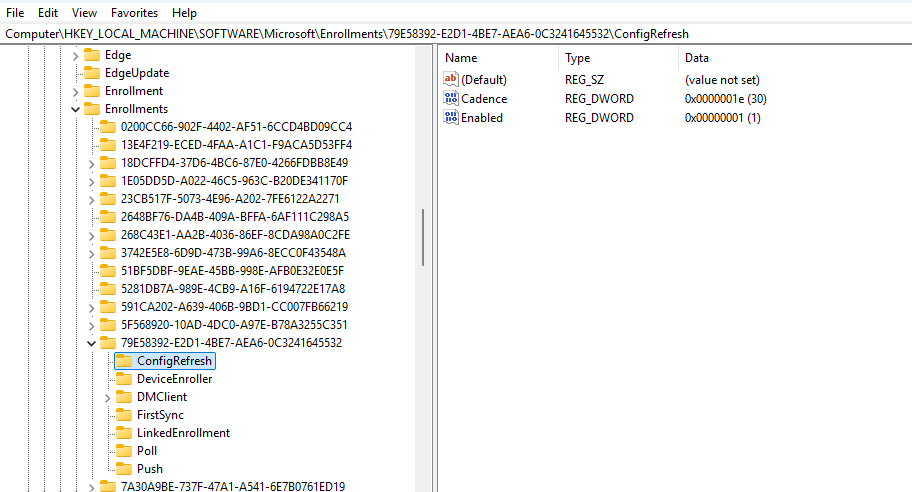
Config Refresh settings are written through MDM policy configuration and can be verified in the device registry after policy deployment.
HKEY_LOCAL_MACHINE\SOFTWARE\Microsoft\Enrollments\”Intune Policy Provider GUID” \ConfigRefresh
I searched for ‘ConfigRefresh’ in the Enrollments Key to easily find the correct GUID
Event Viewer
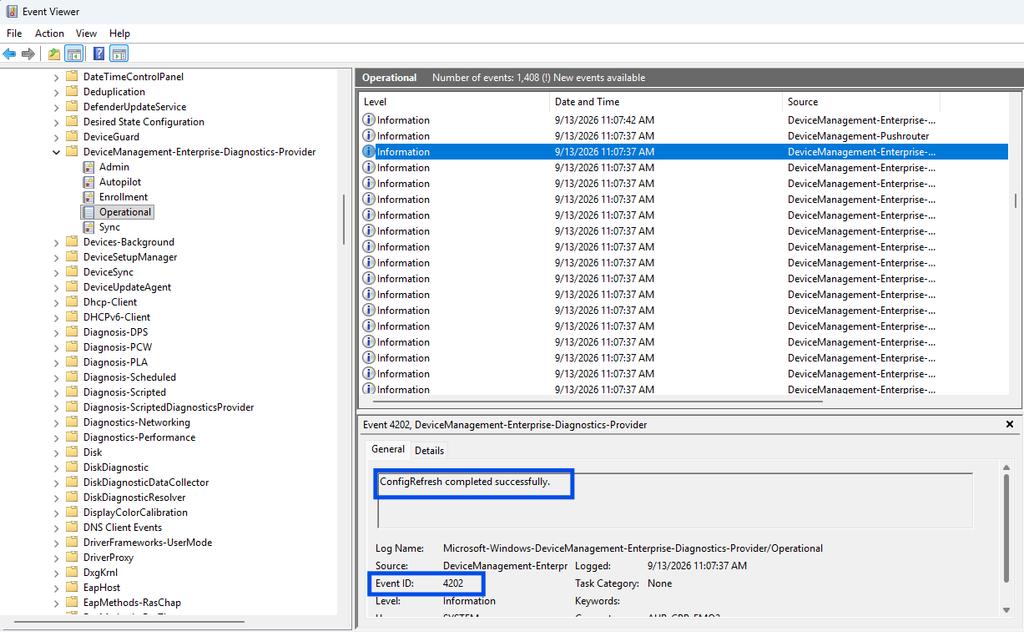
Windows logs Config Refresh activity, making Event Viewer one of the best places to validate policy reapplication and troubleshoot issues.
check the eventviewer logs under Applications and Service Logs > Microsoft > Windows > DeviceManagement-Enterprise-Diagnostic-Provider and look/filter for event ID 4202
Task Scheduler
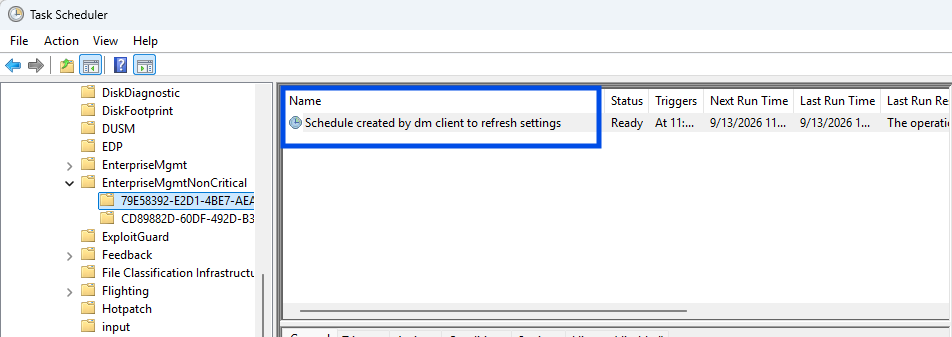
A Config Refresh scheduled task is created on supported devices to execute the refresh cycle at the configured interval.
Pausing Config Refresh
One of the newest additions is the ability to temporarily pause Config Refresh directly from Intune.

This is useful when:
- Troubleshooting devices
- Testing custom configurations
- Performing maintenance activities
- Investigating configuration conflicts
Administrators can pause policy enforcement for a specified number of minutes, up to 1,440 minutes (24 hours). After the pause period expires, Config Refresh automatically resumes.
Best Practices
Enable It Everywhere
If you’re managing Windows 11 devices with Intune, there is little reason not to enable Config Refresh.
Start With 90 Minutes
This provides a familiar Group Policy-like experience without generating unnecessary processing.
Use for Security-Critical Policies
Settings such as:
- Defender configuration
- Security baselines
- Device restrictions
- Attack surface reduction rules
benefit significantly from faster reapplication.
Monitor Unexpected Drift
Frequent policy reapplication can help identify applications or processes that continually modify managed settings.
Final Thoughts
Config Refresh is one of the most important improvements Microsoft has introduced for modern endpoint management. It closes a long-standing gap between Group Policy and cloud-native management by ensuring that managed settings remain enforced, even when devices are offline.
For organizations moving fully to Intune, Config Refresh provides a more resilient and predictable management experience. If you haven’t enabled it yet, it’s worth adding to your Windows 11 configuration baseline today.
Have you already enabled Config Refresh in your environment? If so, what refresh interval are you using and have you noticed any impact on compliance or troubleshooting?