Running the previous build of Windows 11 or Windows 10 and the new build is not showing up for you? Checked updates in setting with no new build available? This might be due to policies set on your device trough Group policies or Intune set by you company admin. If those are not interfering with …
Category: ITPro – Dojo
Jan 14
Deleted shortcuts by Attack Surface Reduction rule
Yesterday, January 13th an unintentional impact was triggered by a pattern update (1.381.2140.0) to users that had the ASR rule “Block Win32 API calls from Office macro” set to block mode. The impact was hard to miss, shortcuts pinned to taskbar & in the start menu went missing. The best thing to do was change …
Oct 14
Delete OEM drivers (to enable memory integrity)
On Windows 10/11 when memory integrity cannot be switched on due to incompatible drivers, you can use pnputil.exe to remove the affected OEM drivers Open Windows Security Select Device Security Select the Core isolation details Set the slider to ON to enable core isolation If any incompatible (old) drivers are on the system, you will …
Aug 13
Reliability History- quick status check
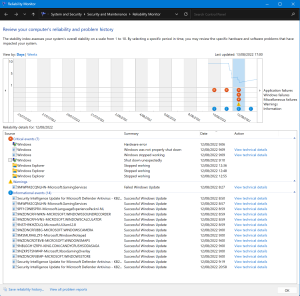
When issues arrise on a Windows device many of us dive into the eventlogs, check when latest updates were installed, when the device was restarted, how often does a certain app crash… This can be quite a job filtering through logs, looking up info at numerous locations. Windows has a built-in tool that does a …
Jul 31
The #Windows11 context menu
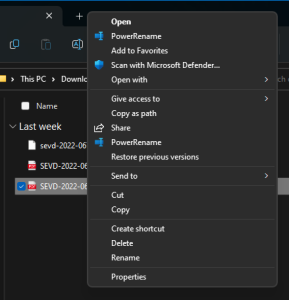
Windows 11 introduced the new context menu (right-click menu) The new menu has the most used options instantly available where the less used options are ‘hidden’ behind the ‘Show more options’ extra click For me the new menu took some getting used to, but once embraced it’s very nice to use! Not everyone has gotten …
Jul 31
Best Practice Analyser – ‘Warning’ Short file name creation should be disabled – Configuration

Disabling Short filename Creation frees up performance for other file server tasks This will stop NTFSfrom generating the 8 char filename alias for all files (only required for very old software) Example: Query the current state for the setting: To disable the function, change the following registry value & reboot the system HKEY_LOCAL_MACHINE\SYSTEM\CurrentControlSet\Control\FileSystem NtfsDisable8dot3NameCreation Set …
Jun 21
Retrieve Oem bios Windows License key (uefi)
** updated 9/8/2026 to reflect deprecation of wmic and vbs ** Did a clean install on a device & Windows did not pick up the bios activation key? no 3rd party tools required, these commands will retrieve the key for you Run this in PowerShell (Elevated) to retrieve the key Retrieve & install: (run in …
Jun 19
Windows 11 Release Health Videos
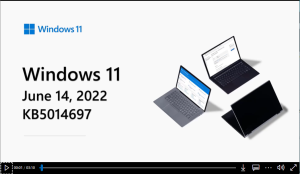
The Windows 11 release health page found here: Windows 11 Updates Has this great new feature, every month the Patch-Tuesday update changes are neatly bundled with a video explaining what’s fixed & what’s new in this month’s updates and even some tips! Making them easier to understand even for less tech savvy end-users. Here’s the …
Jun 13
Windows Update: Get me up to date
This new option in Windows 11 called ‘Get me up to date’ is located in the settings app, under Windows Update / Advanced options Once turned on, Windows Updates will get your device updated as fast as possible restart as needed even if you’re in active hours, a great option to use when going out …
May 29
Have you really turned it off and on again?
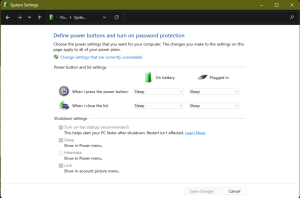
Yes it’s the all time classic answer calling Helpdesk, but things have changed since Windows has Fast Startup enabled by default. This happened with the release of Windows 8.x, before then a simple restart was equal to turning it of and on again. Users will tell you they already restarted the device & the issue …

Sponsored by Aurelium NV

Microsoft Learn