Hi all, last Friday Microsoft released Windows 11 Build 26340.9233 to the Experimental Channel.
My Surface 7th edition with Intel, is acting strang with this build, resumes from standby in a non-responsive state or with explorer/taskbar not running, still working on getting the feedback filed…
Changes and improvements gradually being rolled out
[Modernized AutoPlay experience]
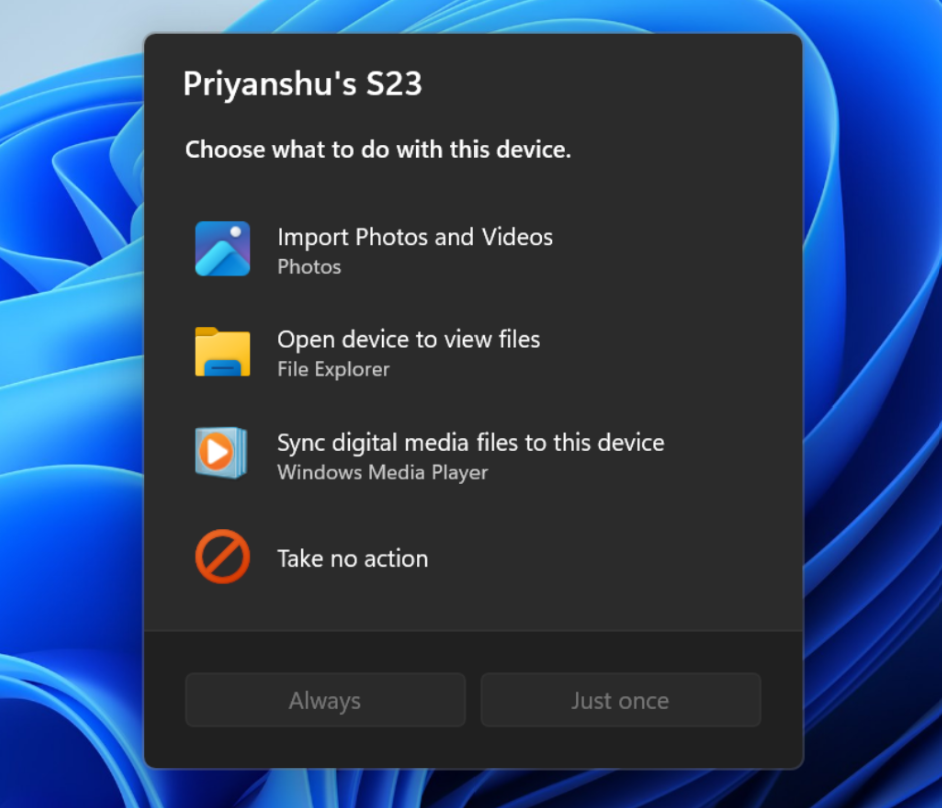
- We’ve updated the AutoPlay dialog that helps you choose the preferred experience when devices are connected to your PC, such as a phone, camera, or removable drive. Rebuilt with WinUI, the refreshed experience is more consistent with the rest of Windows, supports dark mode, and continues to provide the familiar AutoPlay actions you use today. The experience is also more responsive to text scaling and display settings. Notifications for this dialog are now docked in the notification center for easy accessThe new AutoPlay experience, shown in dark mode.
[Accessibility]
A simpler way to open apps maximized
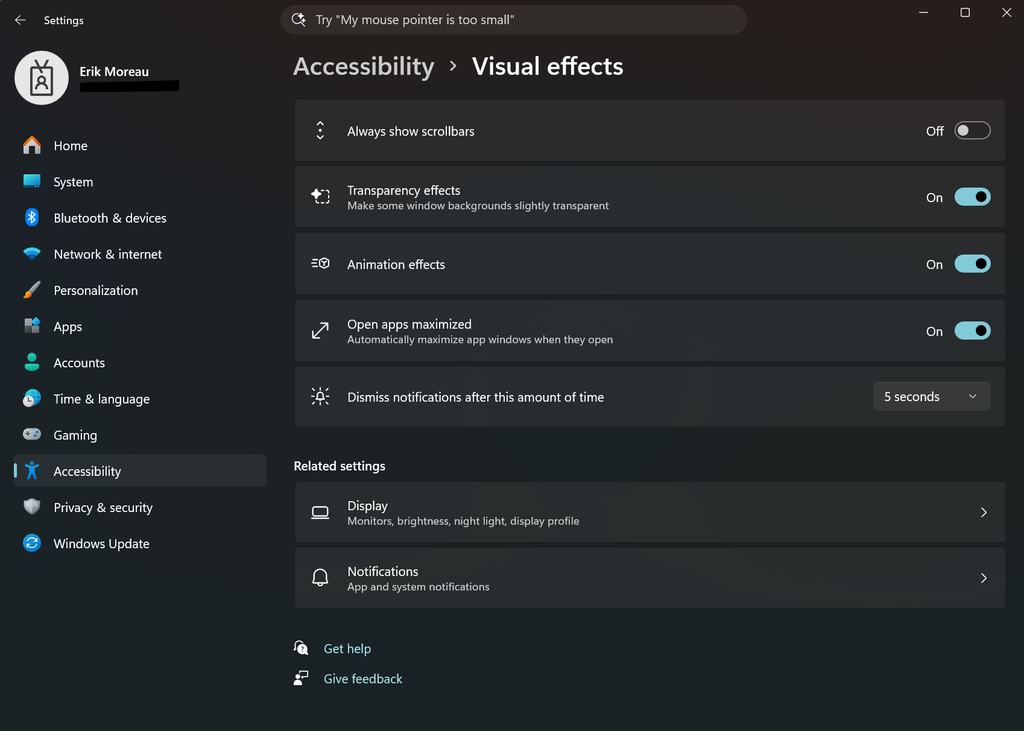
- We’re introducing a new accessibility setting, Open apps maximized, that automatically maximizes app windows when they open, so you no longer have to do it yourself every time. This small change removes a bit of everyday friction, whether you use a screen reader or magnification, work in tablet mode, or simply prefer a consistent, full-screen workspace.
- To turn it on, go to Settings > Accessibility > Visual effects, and turn on Open apps maximized. Once enabled, Windows maximizes app windows for you as they open. Give it a try, and let us know how it works for you.
Feedback: Share your thoughts in Feedback Hub (WIN + F) under Accessibility > Visual effects.
[Manage camera, microphone, and location access for desktop apps]
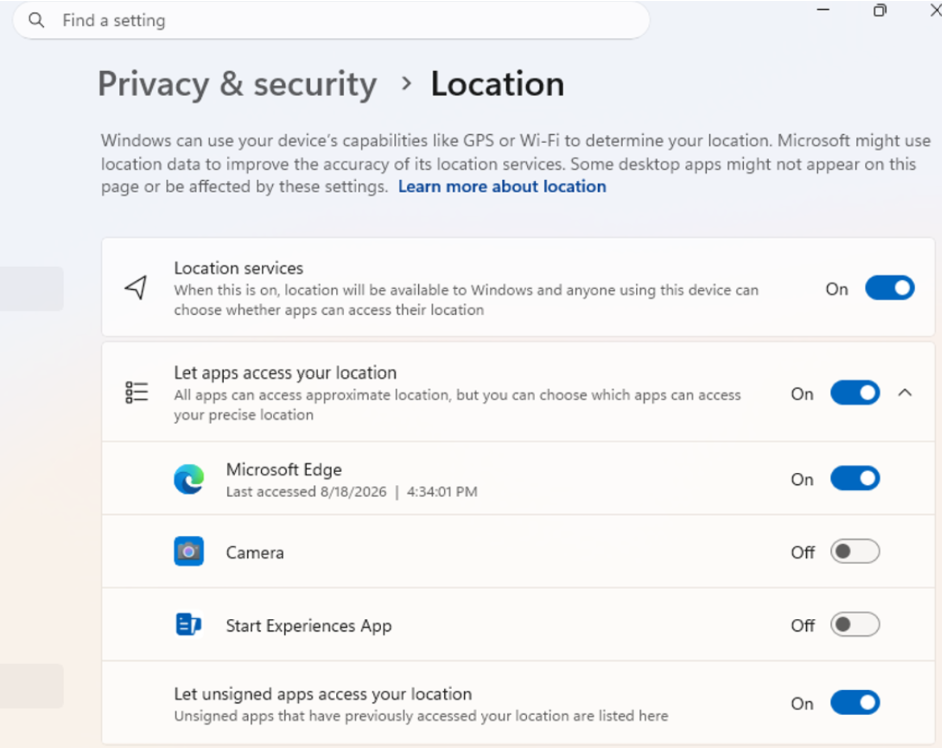
- Windows Insiders can now manage camera, microphone, and location permissions for individual desktop apps. Previously, access for traditional desktop applications was managed through a single device-wide setting.
- With this update, you can review and control access on an app-by-app basis, giving you greater visibility into which apps are requesting access to sensitive resources and more control over your privacy choices. Our goal is to make privacy permissions easier to understand and manage across the wide range of desktop apps people use every day.
What’s changing
- Allow or deny access for each desktop app individually.
- Go to Settings > Privacy & security > Camera, Microphone, or Location to review and manage permissions.
- Apps that haven’t yet accessed a resource prompt for permission the first time access is requested.
What stays the same
- Existing app permission decisions are preserved.
- Apps previously granted access continue to have access.
- Apps previously denied access remain denied.
- No action is required, and no settings are reset.
- Existing enterprise policies continue to function as designed. We’re exploring additional management capabilities.
Notes
- Most desktop apps appear with clear app attribution. However, some apps that rely on shared system components, browser-hosted experiences, or similar technologies might appear under a different name than expected.
- Some desktop apps might appear as Unsigned if Windows can’t verify publisher information. Only grant access to apps you recognize and trust.
Feedback: Share your thoughts in Feedback Hub (WIN + F) under Settings > Privacy Settings.
[File Explorer]
- PDF and non-HTML files downloaded from the web can now be previewed automatically in the preview pane.
[Microsoft Store]
- This update provides support for in-app purchases in packaged WinUI 3 apps that require elevation, helping developers offer purchases through Microsoft’s integrated commerce platform.
[Taskbar]
- Fixed an issue in the latest builds causing taskbar animations to briefly work and then stop working.
[Input]
- Fixed an issue in the latest builds causing the mouse cursor not to be visible in certain apps.
[Other]
- Fixed an issue from the last flight causing Settings > Windows Update > Windows Insider Program > Flags to appear empty even though flags were available.
- Updated Settings > Apps > Installed apps to show the version number at the top level for packaged apps, as it already does for other apps.
source: Flight Hub